Can’t sync since 1/1/2026. At first I thought it was a bug in AnkiDroid 2.23.2 since it updated on Jan 1st, but my desktop Anki not syncing since yesterday either.
Sync starts, progresses super slowly then times out amd blames network conditions.
BTW Been using Anki and AnkiDroid for over 12 years since 2013 so I’m not a newbie.
I haven’t experienced any syncing issues today with both desktop Anki and AnkiMobile. And, we haven’t seen other complaints about this general issue from other users. So, it appears that this might be a problem local to your internet connection.
To test whether the problem is with your home internet connection, please try using a different internet connection. For example, for AnkiDroid disable wifi on your phone and try using cellular data instead. Or, for AnkiDroid and for your desktop Anki, if you are using it on a laptop, try a different wifi connection, perhaps at a local library, restaurant, or other place with free wifi.
You also might want to try general internet troubleshooting procedures like resetting your wifi router and/or cable modem. And, powering off and turning back on your mobile device and computer.
Hi Ben, thanks for the reply. Tried syncing on 4G mobile network and first sync timed out, 2nd sync was slow but ultimately successful.
I find it curious that the issue started so dramatically on 1/1/2026 though – wasn’t sure if the cloud service was suspended midnight on 31st Dec
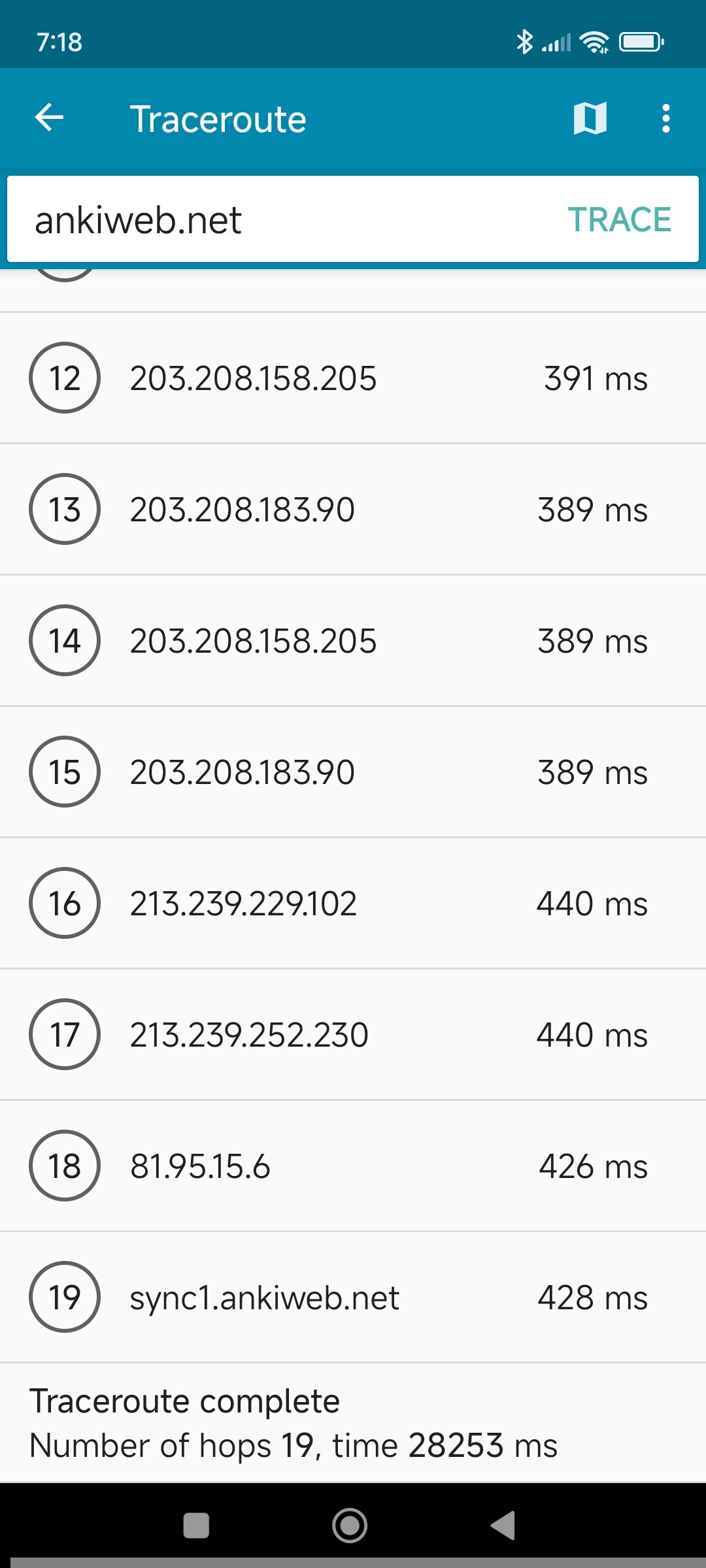
But seriously, could it be a routing issue from Australia? Tracert on PC through my broadband connection shows a lot of very slow hops (see text below) and on mobile network isn’t much better (see screenshot, one extra hop but perhaps a few milliseconds faster)
Tracing route to ankiweb.net [142.132.136.176] over a maximum of 30 hops:

  1    <1 ms    <1 ms    <1 ms  192.168.2.1

  2     *        1 ms     1 ms  n175-33-128-2.sun22.vic.optusnet.com.au [175.33.128.2]

  3     *        *        *     Request timed out.

  4     *        *        *     Request timed out.

  5     *        *        *     Request timed out.

  6     *        *        *     Request timed out.

  7    18 ms    17 ms    17 ms  59.154.57.74

  8    15 ms    15 ms    15 ms  22bt-c93-ig-02-net-lo0.optus.net.au [61.88.33.47]

  9   176 ms   176 ms   174 ms  203.208.131.65

 10   170 ms   171 ms   172 ms  203.208.149.58

 11     *        *      385 ms  203.208.183.45

 12   386 ms   385 ms   404 ms  203.208.158.205

 13   386 ms     *        *     203.208.183.90

 14     *        *        *     Request timed out.

 15   396 ms   396 ms   396 ms  ae1-2014.nbg40.core-backbone.com [81.95.9.14]

 16   435 ms     *        *     core-backbone.hetzner.com [5.56.20.254]

 17   436 ms   436 ms   444 ms  core22.fsn1.hetzner.com [213.239.254.233]

 18   436 ms   446 ms   436 ms  ex9k2.dc18.fsn1.hetzner.com [213.239.254.246]

 19   437 ms   437 ms     *     sync11.ankiweb.net [142.132.136.176]

 20   437 ms   436 ms   436 ms  sync11.ankiweb.net [142.132.136.176]
Definitely a routing issue between my ISP and the ankiweb servers.
On mobile Traceroute shows a 10% improvement since yesterday – two less hops and five seconds faster (see screenshot) – and I had intermittent success syncing today.
On desktop Anki still timed out but I was able to resolve by increasing the network timeout value from 30s to 40s under Tools; Preferences; Syncing.
Will put a feature request to the AnkiDroid team to add a Network Timeout option on mobile version same as the desktop version.
To be added in the AnkiDroid 2.24 alpha series, likely AnkiDroid 2.24.0alpha2: Releases · ankidroid/Anki-Android · GitHub . Download ‘Parallel.A’ to try it out alongside the ‘production’ AnkiDroid when it’s out.
Hi, I am also getting the same issue, I’ve been unable to sync for a few days. I’ve increased my timeout to 60s and it still almost always fails. I also think this is very likely an ISP(Optus)-Hetzner routing issue, not a local problem. I’ve attached traceroute outputs for my home internet connection and mobile (same ISP) below.
I don’t really know what to do about this. This doesn’t seem like an Anki problem. Should we be contacting Optus?
Home:
% traceroute ankiweb.net
traceroute: Warning: ankiweb.net has multiple addresses; using 162.55.238.75
traceroute to ankiweb.net (162.55.238.75), 64 hops max, 40 byte packets
 1  mygateway (192.168.0.1)  5.706 ms  2.329 ms  1.764 ms
 2  n175-37-200-1.sun1.vic.optusnet.com.au (175.37.200.1)  12.124 ms  11.703 ms  11.355 ms
 3  * * *
 4  * * *
 5  * 59.154.18.57 (59.154.18.57)  24.574 ms  29.140 ms
 6  * 22bt-c93-ig-02-net-lo0.optus.net.au (61.88.33.47)  32.989 ms *
 7  59.154.18.49 (59.154.18.49)  23.576 ms  24.905 ms  24.699 ms
 8  22bt-c93-ig-02-net-lo0.optus.net.au (61.88.33.47)  24.988 ms  27.217 ms  23.811 ms
 9  203.208.131.65 (203.208.131.65)  209.664 ms * *
10  * * 203.208.149.58 (203.208.149.58)  177.738 ms
11  203.208.178.205 (203.208.178.205)  404.515 ms
    203.208.183.45 (203.208.183.45)  397.901 ms
    203.208.178.205 (203.208.178.205)  406.683 ms
12  * * *
13  ae6-2011.nbg40.core-backbone.com (80.255.14.246)  413.395 ms * *
14  * * *
15  core22.fsn1.hetzner.com (213.239.254.233)  469.076 ms  457.359 ms
    core24.fsn1.hetzner.com (213.239.252.250)  475.638 ms
16  * core-backbone.hetzner.com (81.95.15.6)  460.308 ms *
17  * * sync2.ankiweb.net (162.55.238.75)  468.391 ms
Mobile:
% traceroute ankiweb.net
traceroute: Warning: ankiweb.net has multiple addresses; using 162.55.238.75
traceroute to ankiweb.net (162.55.238.75), 64 hops max, 40 byte packets
 1  172.20.10.1 (172.20.10.1)  9.437 ms  3.121 ms  3.311 ms
 2  10.111.21.188 (10.111.21.188)  23.422 ms
    10.111.21.189 (10.111.21.189)  29.086 ms
    10.111.21.188 (10.111.21.188)  29.197 ms
 3  172.24.126.109 (172.24.126.109)  311.724 ms
    172.24.126.111 (172.24.126.111)  28.936 ms
    172.24.126.109 (172.24.126.109)  23.608 ms
 4  10.194.123.209 (10.194.123.209)  25.916 ms
    10.194.123.213 (10.194.123.213)  29.535 ms  30.976 ms
 5  * * *
 6  * * *
 7  * 124.19.61.33 (124.19.61.33)  101.320 ms  44.516 ms
 8  * * 22bt-c93-ig-02-net-lo0.optus.net.au (61.88.33.47)  40.837 ms
 9  59.154.57.182 (59.154.57.182)  43.749 ms
    203.208.131.65 (203.208.131.65)  208.911 ms
    59.154.57.182 (59.154.57.182)  41.974 ms
10  203.208.149.58 (203.208.149.58)  195.359 ms  341.317 ms
    22bt-c93-ig-02-net-lo0.optus.net.au (61.88.33.47)  70.848 ms
11  203.208.131.65 (203.208.131.65)  517.966 ms * *
12  203.208.149.58 (203.208.149.58)  215.515 ms  195.545 ms
    203.208.158.205 (203.208.158.205)  339.130 ms
13  203.208.183.45 (203.208.183.45)  469.541 ms
    203.208.183.90 (203.208.183.90)  331.896 ms
    203.208.183.45 (203.208.183.45)  539.146 ms
14  * 203.208.158.205 (203.208.158.205)  322.608 ms
    ae4-0.ams10.core-backbone.com (80.249.209.128)  483.694 ms
15  ae6-2011.nbg40.core-backbone.com (80.255.14.246)  567.406 ms * *
16  * * *
17  ae6-2011.nbg40.core-backbone.com (80.255.14.246)  643.500 ms
    core21.fsn1.hetzner.com (213.239.254.213)  615.328 ms  560.601 ms
18  core-backbone.hetzner.com (5.56.20.254)  614.806 ms  635.935 ms  471.102 ms
19  sync2.ankiweb.net (162.55.238.75)  473.510 ms *
    core22.fsn1.hetzner.com (213.239.254.237)  514.954 ms