So, I am trying to create a simple image occlusion card and am encountering several problems.
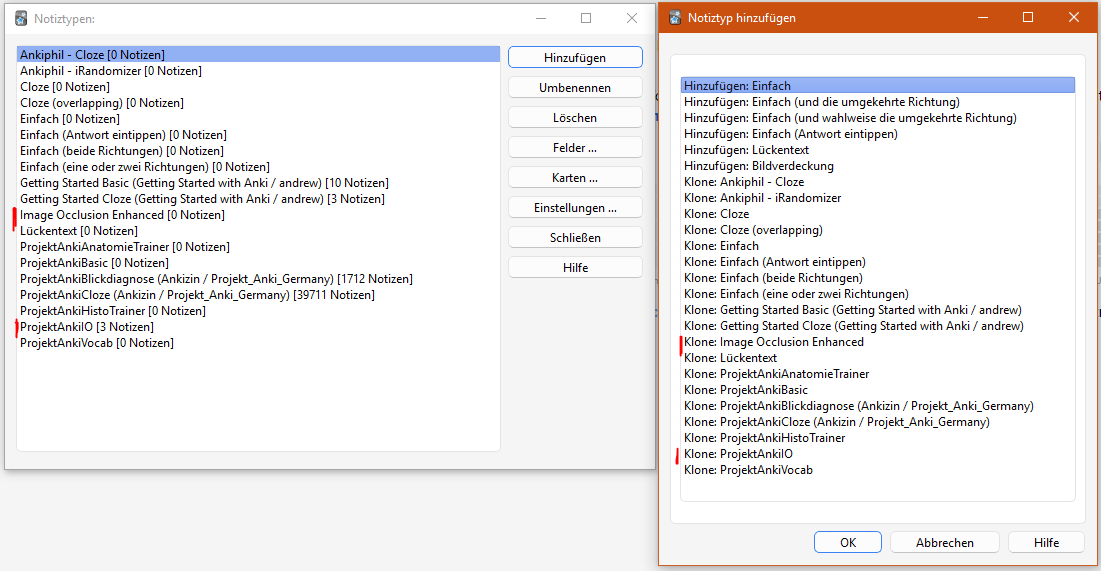
Firstly, the note type “image occlusion” doesn’t exist in my Anki, neither on PC nor on iPhone or iPad, using Version 25.07.5 (7172b2d2), Python 3.13.5 Qt 6.9.1 Chromium 122. However, the note type “Image Occlusion Enhanced” shows up in the list of note types, although I never installed nor used the add-on I believe this note type belongs to (Image Occlusion Enhanced). Besides, I can’t even create image occlusion cards using this note type because the corresponding button just doesn’t show up.
Now, I am using a, I think, modified version of the AnKing note type add-on which is the Ankizin note type add-on (a German version, so to speak https://ankiweb.net/shared/info/2058530482) and noticed that it comes with a “ProjektAnkiIO” note type with which I can now actually create cards with image occlusion on PC and also my other devices (iPhone and iPad). So, first problem solved but I wanted to include the story behind it because it may be causing the second issue.
The second problem now is that it works fine on mobile, showing the occluded image on the front of the card and then the uncovered one on the back. On PC, however, the first card is always with the front and back side reversed, so showing the non-occluded image as the question and the occluded one as answer. The weird thing is that when I complete the card (for the purpose of testing) and then use ctrl+z to undo, it will then show correctly with the occluded image as question and the uncovered picture as solution. At first, I thought all cards are like this but it’s only ever the first one in the deck whenever I open the deck again. So when I start the session, choose a deck and start reviewing cards, the first card will be buggy, the rest will be fine (afaik atm). When I take a break, leave the review and come back later, choose the same deck and pick up reviewing just where I left off, again, the first image occlusion card I encounter will have reversed sides, the rest is fine. This is obviously inconvenient but since the rest of the cards are working, it’s manageable right now. Still, maybe someone is able to help or figure out why this happens and if I can do something to avoid it. Sadly, hours of googling didn’t yield any helpful information regarding this specific topic 
TIA!
 it just didn’t occur to me that it has a different name in German. Anyway, the native thing works as intended without the bug
  Thanks!!