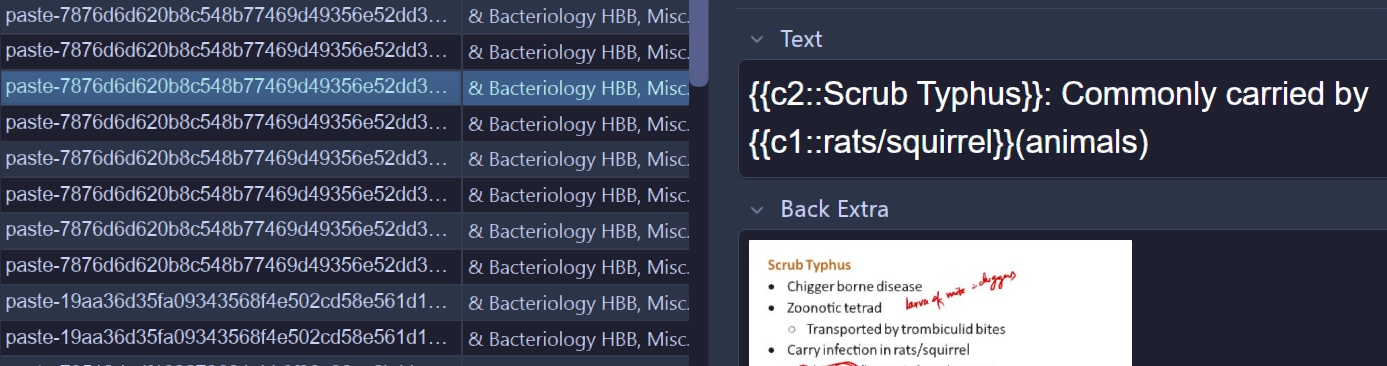
So i had recently downloaded a deck which consists of cloze deletion cards. Now when studying these cards are fine but when i go to the browser they appear in reverse. As you can see its showing the paste-787*** i.e the image, for cards which have Text at the back it shows the text at the back and NOT the front.
I had searched the web to no avail. Would be great if someone could help!
I’m not sure what you expect to see different here, but the editor (the part of the browser on the right-hand side) is always displaying full info that is stored on a Note (which includes everything from the front and back of all its cards, and even fields that are not embedded on either of the sides), not any specific Card (even when the toggle on the top is set to Cards). Maybe reading a bit about the differences between the two concepts can help alleviate the confusion.
If what you are really looking for is a way for the browser to not accidentally spoil the answer, you can hide the “Back Extra” field by toggling Collapse by default in its field settings.
Thanks for your response !
See my issue is this, i want the browser to Display the front and NOT the back of the card and the reason is not ‘spoiling the answer’ but it is that I study in a manner that involves me searching for keywords and then suspending the relevant cards selectively which includes me having to look over them in the browser section so when it doesnt show the Front of the card, i am not able to identify the card without having to click on it i.e view the Editor for each card.
What column are you looking at in Browse? You cut off the column headers and there are 2 possible avenues to answer your question, depending on the column.
This is the Sort field column, for all my other cards it shows the Front and its been like that since start, ive made no alterations in the column order.
Then it sounds like the note type that came with this imported deck must have “Back Extra” designated as the Sort Field. You can either (a) fix that for this note type, or (b) change these notes to use the same note type of your other notes.
Thanks boss! You solved it..