Description:
When typing Tamil characters வ and ப at the beginning of a field in the Anki desktop editor on Linux (Ubuntu), the rest of the characters are usually rendered as squares / invisible.
- The issue does not occur in the card display (review mode or exported cards).
- Using fonts like Noto Sans Tamil in
editor.css does not fix the problem.
- The issue appears only in the editor, not in the card itself.
Steps to reproduce:
- Install Anki on Ubuntu (tested version: 2.1.x).
- Ensure
Noto Sans Tamil is installed. Check with:
fc-list | grep -i "Noto Sans Tamil"
- Set editor font via
collection.media/editor.css:
body, textarea, .editor-field, .field {
    font-family: "Noto Sans Tamil", "Latha", sans-serif !important;
    font-size: 20px !important;
}
- Open Add in the editor.
- Type Tamil characters வ and ப at the start of the field.
Expected behavior:
Characters should display correctly as they do on cards and in other editors.
Actual behavior:
Characters are replaced by squares or the following characters are invisible.
System information:
- OS: Ubuntu 24.04.3 LTS
- Anki version: Version 25.09.2 (3890e12c)
Python 3.13.5 Qt 6.9.1 Chromium 122
- Font: Noto Sans Tamil
- Input method: ibus-m17n, Tamil layout
- Editor CSS: as above
Notes:
- Workaround: inserting Zero Width Space (U+200B) before the character doesnť help. Copy paste of the words from for ex. Notepad, doesn´t help.
- This appears to be a bug in Qt WebEngine / Anki editor, not a font or Unicode problem.
What does this do? Normally you’d have to include the .css in your card template, but you do not seem to be doing that.
Just placing this file there won’t affect the editor at all. Or are you maybe using an addon (and thus might be facing a bug caused by that addon)?
Edit: Even manually adding your code to the actual editor.css via dev tools won’t cause the bug for me on debian linux:
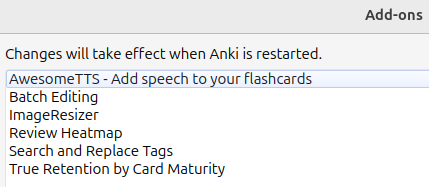
I’m using these addons. Do you think any of these may cause problems?
If this helps, I had a similar issue in Joplin app. There was a same problem, but in tables… I wrote this in the Jopplin app forum.
Additional info regarding Tamil font rendering issue – resolved in tables via userstyle.css
Hi everyone,
Just wanted to share an additional update regarding the Tamil font rendering issue.
I was able to resolve the issue on the Android app using the Extra Markdown viewer plugin, and Tamil text displays correctly there now.
However, I was still facing issues on the Desktop app, specifically when Tamil text appeared inside Markdown tables. The rest of the text rendered fine, but inside tables, characters like ப and வ were still showing as tofu (□).
After some trial and error, I fixed the issue by adding the following CSS to the custom stylesheet for rendered Markdown:
Tools → Options → Appearance → Show Advanced Settings → Custom stylesheet for rendered Markdown (userstyle.css)
/* For styling the rendered Markdown */

body {
  font-family: "Noto Sans Tamil", sans-serif !important;
}

table {
  font-family: "Noto Sans Tamil", sans-serif;
}

table td, table th {
  font-family: "Noto Sans Tamil", sans-serif;
}
After applying this, the Tamil font is now rendered correctly in tables as well.
Hope this helps anyone facing similar issues – and perhaps this can be considered for a more integrated solution in the future.
Thanks!
Try it. Run Anki in safemode: anki --safemode.
It appears you solved the issue by changing the font; which indicates a font issue. Anyways, I never used Joplin so cannot really say much about it.
Actually, that does remind me of something: I had an issue with spaces and thought that anki was the culprit (see Make space width / space usage in front of units consistent). Turns out that my debian was shipping an old version of a font which was simply having a bug; upgrading debian to the unstable testing version (and thus using a newer version of that font) solved the issue completely.
Maybe that is the reason why I don’t see the behavior you are describing, but you saw it not only in Anki but also in other apps?
And since this doesn’t work natively (as I indicated above), you could actually do something similar in a native way. You can just change the editing font, though I still couldn’t reproduce your issue on my debian machine. See Adding/Editing - Anki Manual.
I tried to run Anki in safemode and the problem still persists, but I solved it! Thank you! The problem was with the font (I looked up the Adding/Editing manual as you suggested):
Add → Fields → Editing font → I chose “Lohit Tamil”
So to me (not an IT person) it looks like a font bug…?
Thank you for your help 
D.