Table of contents
- The problem
- The proposal
- Background
The problem
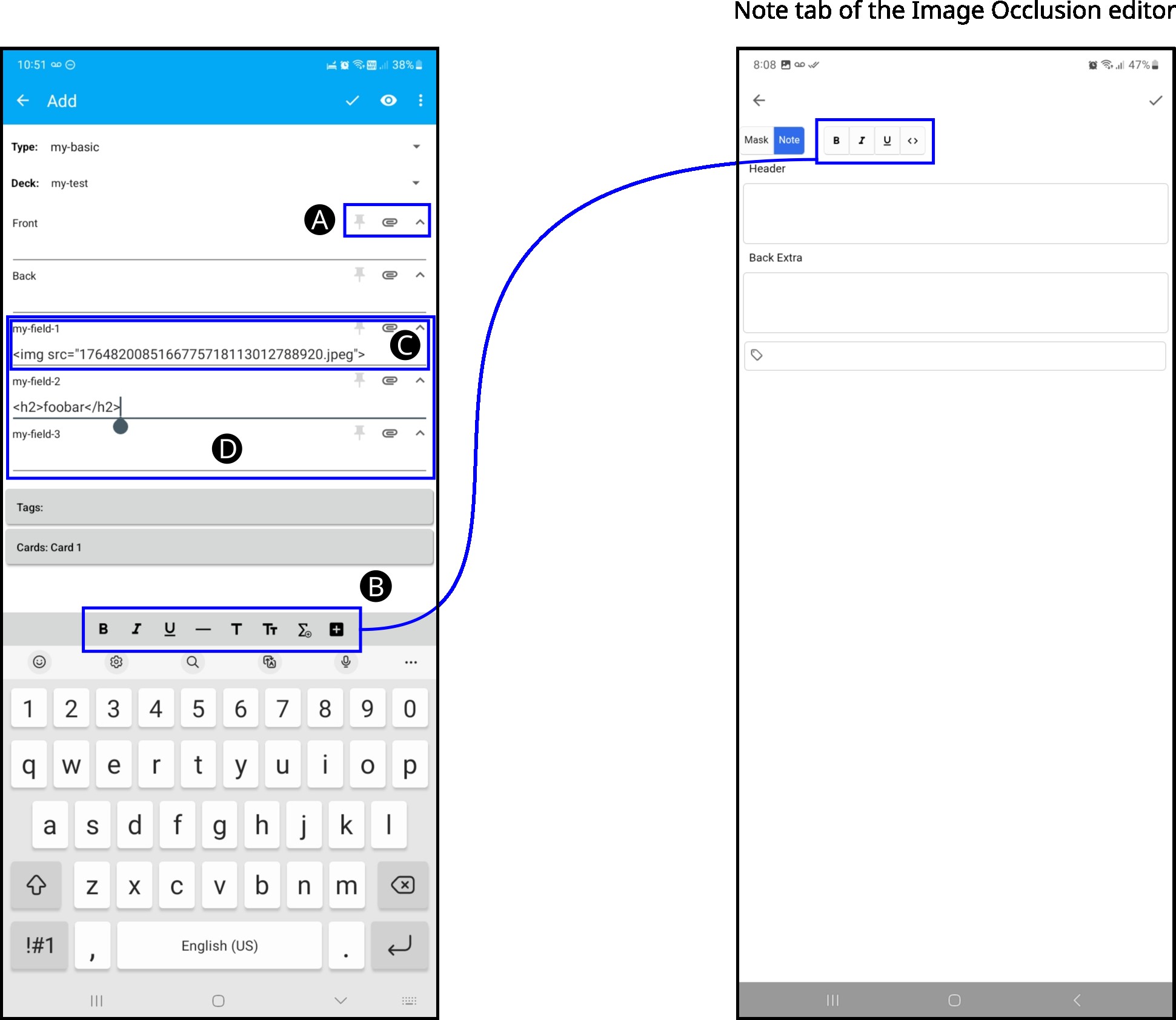
In AnkiDroid version 2.22.3 (latest release as of writing), the “Note” tab in the Image Occlusion editor is missing these features:
- A. It doesn’t show the buttons “Toggle sticky”, “Attach” and “Collapse field” for each field
- B. When editing a field, the bar, which contains the buttons for styling the text, is not shown. It only shows a bar that only has allows setting “Bold”, “Underline”, “Italics” and toggling HTML view.
- C. Images are not inserted as paths. There exists a bug when pasting images, see https://github.com/ankidroid/Anki-Android/issues/19679
- D. Custom fields are not shown. It only shows “Header”, “Back Extra” and the Tags.
These 4 features are supported in the field editor for Basic notes. The image below compares the features available when editing a Basic note type (image on the left) and the features available in the “Note” tab of the Image Occlusion editor (image on the right).
The proposal
The aim of this proposal is to modify the current user experience to support the 4 missing features mentioned in the previous section. It introduces 3 changes, each explained in a separate paragraph.
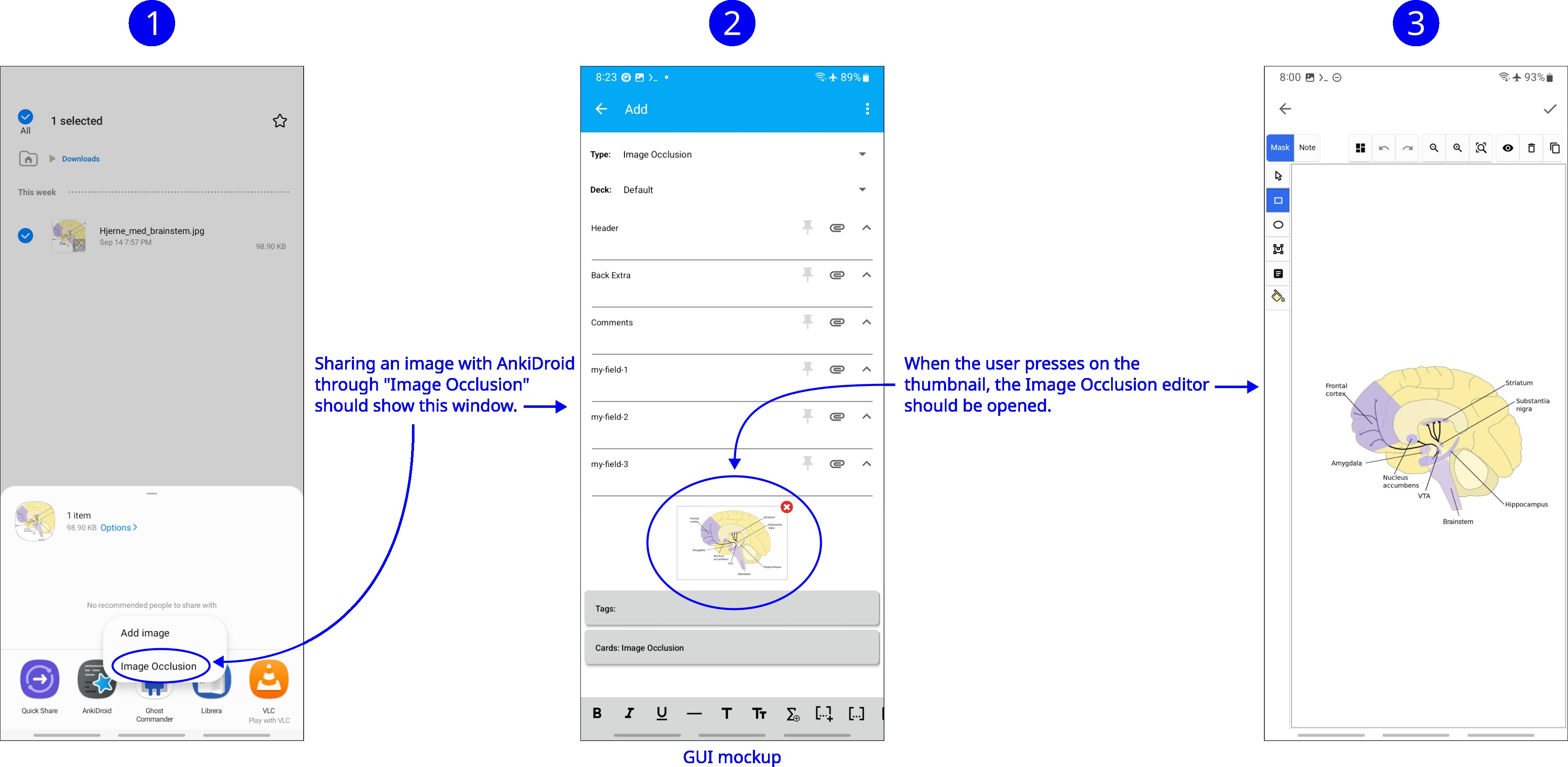
Firstly, when the user shares an image with Anki through the “Image Occlusion” button that is shown in a file browser, Anki will be opened. Anki will show the window that lists the fields of a new note just like a Basic note. The selected note type would be “Image Occlusion” and a thumbnail of the image would be shown below all the last field. In the field editor, when the user presses the thumbnail of the image, the Image Occlusion editor would be opened. Advantage: We would be using the same interface for editing fields that is used for a Basic note, so we would have the aforementioned missing features A, B, C, D. Apart from that, we would reduce the cognitive load for users.
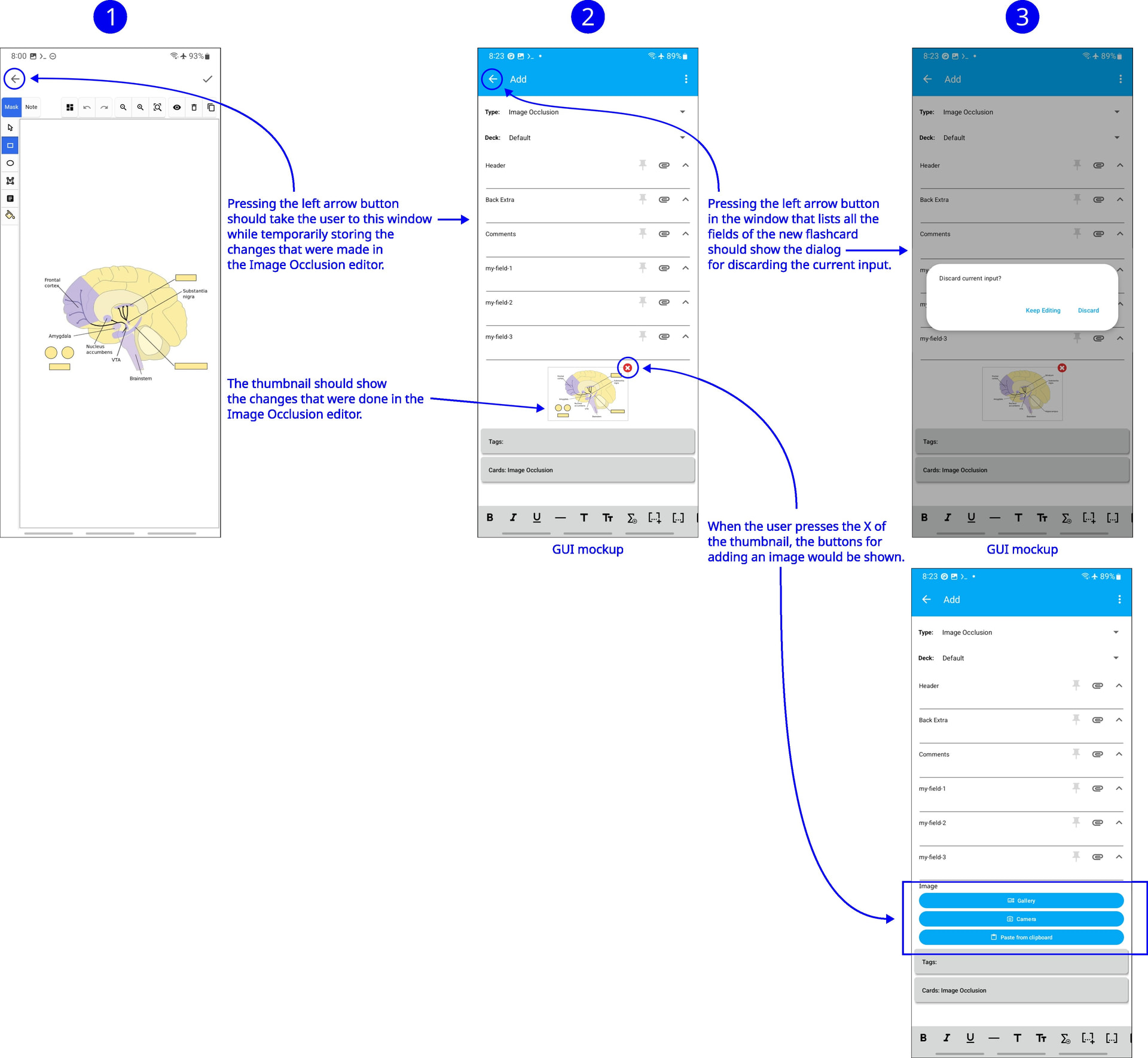
Secondly, change the behavior of the “left arrow” in the Image Occlusion editor to take the user back to the window that shows the field of the new note. This way, the user will be able to set the deck or edit other fields without having to discard the changes that she/he did in the Image Occlusion editor. If the user wanted to discard the input while being in the Image Occlusion editor, then the user should press the “left arrow” button to go back to the fields of the new note and while being in that window press the “left arrow” button again. Advantage:: While creating a new Image Occlusion note, the user is free to go back and forth between the Image Occlusion editor and the fields editor if the user feels the need to do so.
Thirdly, the buttons “Mask” and “Note” would become obsolete, so they could be removed. Advantage: The screen space currently used by “Mask” and “note” could be occupied by other image editing tools that might be added in the future in the Image Occlusion editor (e.g. palette of favourite colors.)

I hope this idea helps developers create a smoother interface that fits most users’ needs.
Background
Over 3 months ago, I opened a feature request in this forum to change the GUI to allow setting the deck for Image Occlusion notes. The next day, one of the contributors decided to start working on it (see https://github.com/ankidroid/Anki-Android/issues/15612#issuecomment-3294647770). The changes were merged to main branch in https://github.com/ankidroid/Anki-Android/pull/19259 and https://github.com/ankidroid/Anki-Android/pull/19607
Today, I found a bug in the latest beta version, so I reported it (see https://github.com/ankidroid/Anki-Android/issues/19679). This caused the previously introduced changes to be reverted (see https://github.com/ankidroid/Anki-Android/pull/19680), so currently AnkiDroid users don’t have a way to set the deck for new notes while in the Image Occlusion editor. I shared my idea in the pull request, which reverted the changes, and I was advised to share my idea in the forum. The previous post I opened was closed on October 15 due to inactivty, so I’m opening this new post.