In portrait mode, when editing a deck, the checkboxes don’t fit on the screen — you can only see them in landscape mode. If you switch the interface language to English, everything fits.
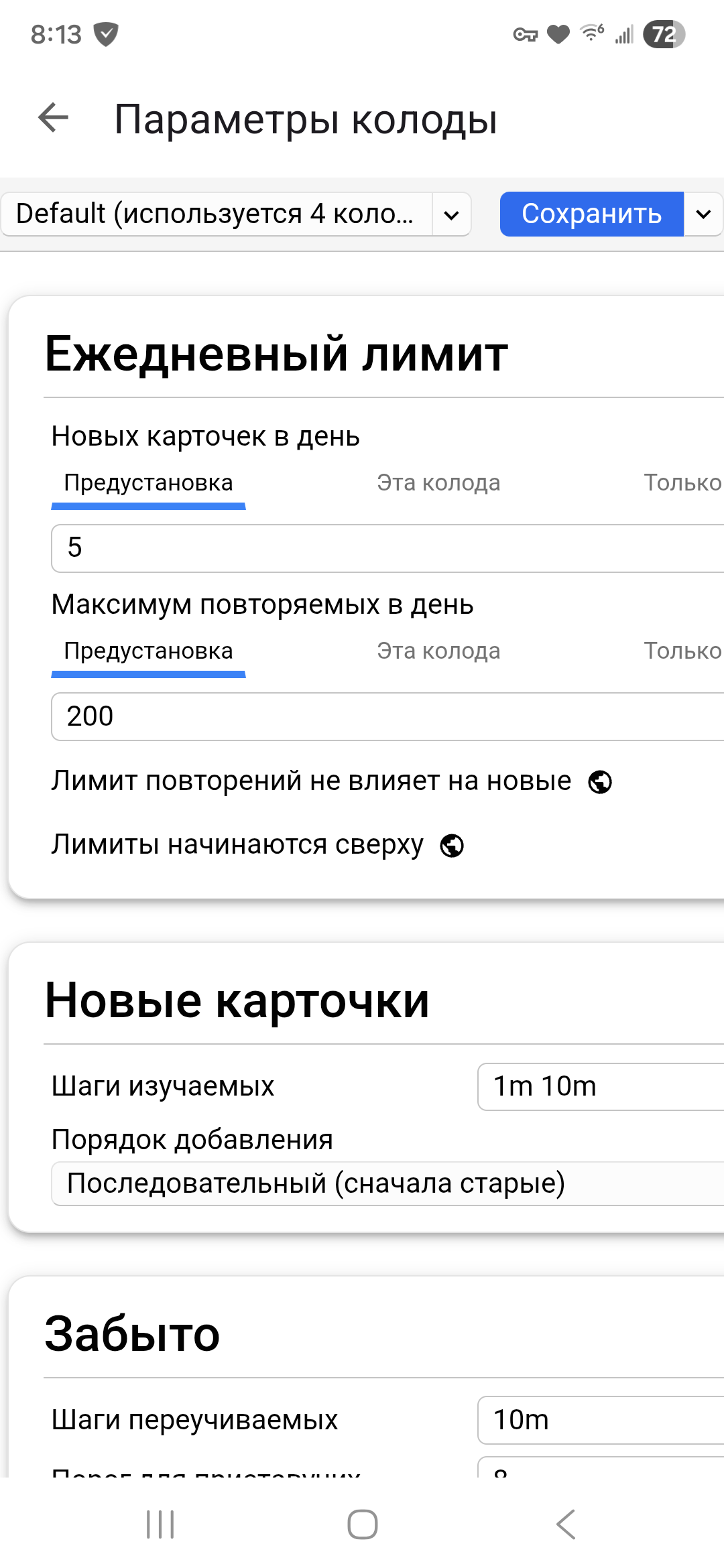
Is there any chance you’re “zoomed in”? Can you try pinching to zoom out?
Pinching only allows you to zoom in further; you can’t zoom out because the scale is already at the minimum
Reproduced. It’s a language issue.
What language did you reproduce it with?
And are you also using 2.23?


But it’s still cut off (see the “reset to default” icon).
Is this only a problem when zooming in AnkiDroid?
No, you can’t zoom out any further. The only way to see the right side of the deck options screen is to change the language or to rotate the phone to landscape mode.
Oops! I made that screenshot while moving between devices with limited internet. I’ll double-check to make sure I didn’t cut that off myself.
I moved this to the Anki category, because it is in the Options screen shared by all the apps.
It has now been observed in AnkiMobile as well, with the interface in Russian.
Anki 25.09 – iPhone14.4 – iOS 26.3.1 [ticket 39433]

@abdo – Does it seem like Changed overflow-x from hidden to auto for AnkiDroid by defkorean · Pull Request #4501 · ankitects/anki · GitHub will fix it across the ecosystem when it is released? Or would AnkiMobile need a separate fix?
Yes, that should fix it for AnkiMobile as well. For more context, there’s also this follow-up fix: Deck Options screen change by defkorean · Pull Request #4558 · ankitects/anki · GitHub