Could do. How would I do this?
Actually, this works for me! Thanks!
1 Like
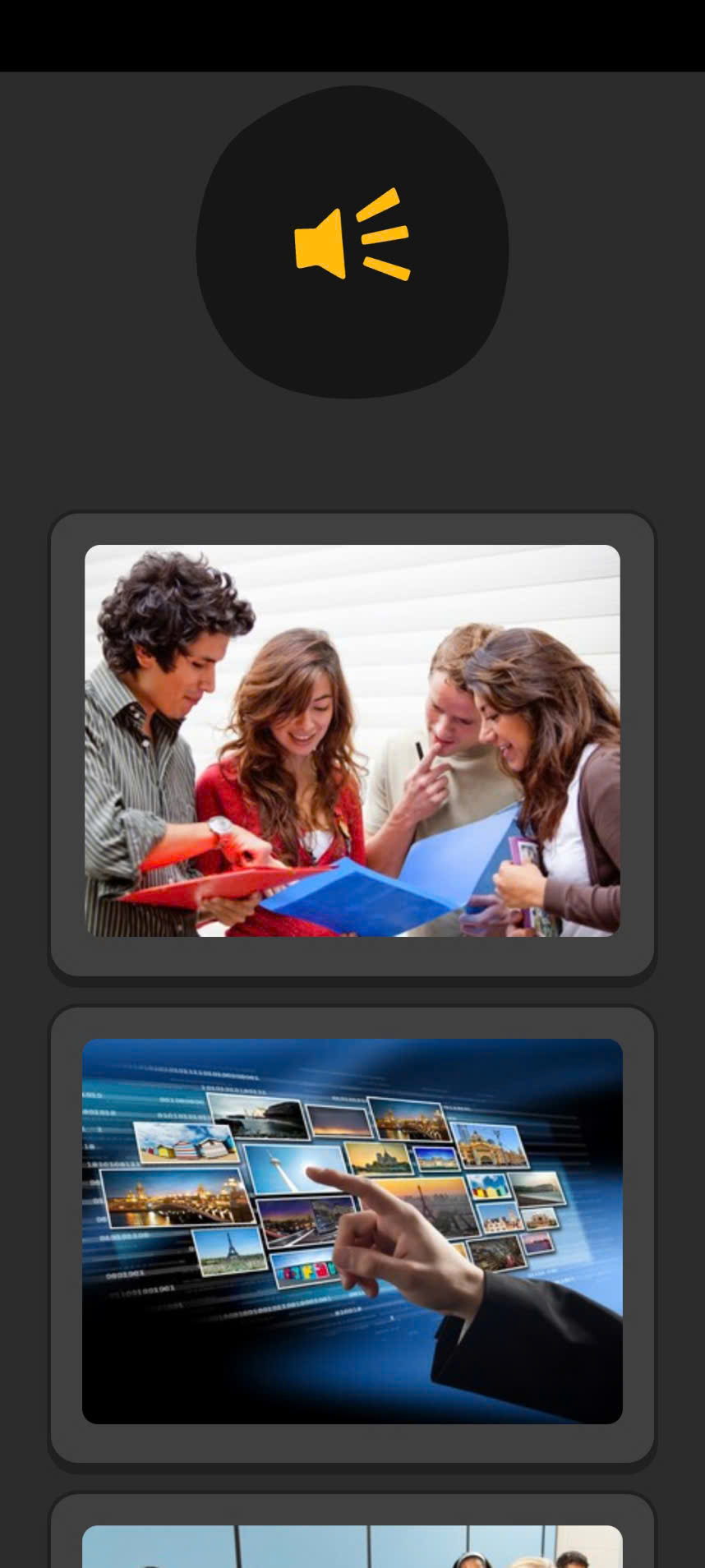

Because that’s what Memrise decided to have as their style for very narrow screens:
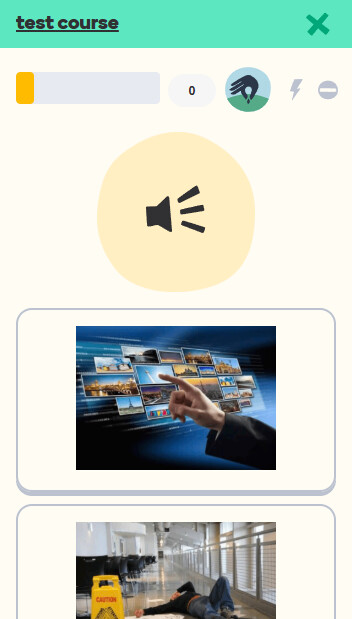
The default template setup recreates exactly that.
If you want the multiple-choice buttons to be always displayed in two columns, you can add the following style to the “User styles” section at the end of the styling tab in your template.
.card-content.mch:not([mode]) #scr-keyboard,
.card-content[mode="mchoice"] #scr-keyboard {
  grid-template-columns: 1fr 1fr;
}
1 Like
Ok, Thanks. I got it
1 Like
How can I have both typing and mcq for a word? Like in Memrise, a word will be shown with everything first and will be asked on mcq first and then typing later or tapping kind like that. Thanks
The MultipleChoice+Typing/MultipleChoice+Tapping Note Types from the shared deck should produce exactly that. You just need to run “Fill Choices” as instructed to activate the MCQ. And to see the info when you are encountering a card for the first time, simply fail it - there are no drawbacks to doing so in the learning stage.
1 Like
Hi what happened to memrise why do so many quit memrise?
1 Like
Quite a lot of things over the years, actually, and they all lead downhill. The latest one, which is still the driving wave, I suppose, is the looming plans to remove all user-created content from the platform. They’ve been postponing it several times so far, but with no other clear indication than the promise to keep it up till the end of this year, it is quite possible that all user courses will be deleted immediately after.
2 Likes
Patch notes for v5.1
1. Fix for audio buttons on iOS/macOS
Because Apple browsers have no support for the CSS used in AnkiWeb audio buttons in v5.0, a separate script was added to patch the issue when necessary:

This should also prevent the same problem from occurring on AnkiMobile and the desktop mac app with buttons for external audio files.
2. Improved right-to-left text support
-
Added a dedicated style for right-to-left tapping cards:
To enable it, add a
dir="rtl"attribute to the<input>element on the front of the Card (or an"rtl"class to its.mem-typingcontainer element):... <input id="typeans" type="text" inputmode="text" autocorrect="off" autocomplete="off" autocapitalize="off" spellcheck="false" dir="rtl"> ... -
Similarly, for typing cards the right-to-left mode can be enabled by adding
dir="rtl"to the same<input>element (or by addingdir="rtl"to the.mem-typingcontainer instead to flip everything, including the label): -
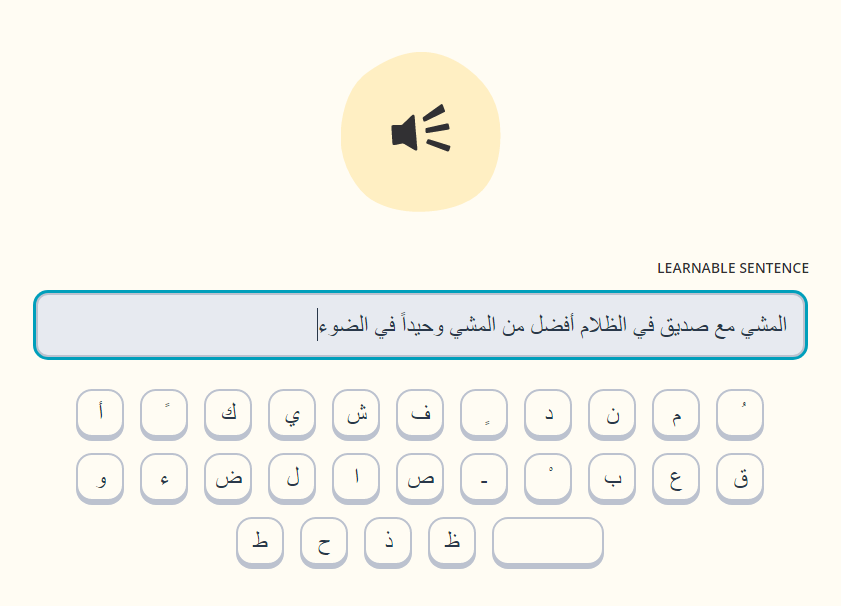
Note that because combining right-to-left characters with left-to-right text (including the source code for the template itself) is notoriously inconvenient, it is better to use Unicode HTML entities instead of explicit characters for setting up the onscreen keyboard. Here is a recommended setup for a full set:
ابةتثجحخدذرزسشصضطظعغػؼؽؾؿـفقكلمنهوىيًٌٍَُِّْThis should render the following when used as the
static keysset (any suggestions for improving the layout are welcome):


3. Empty answers now are always auto-rated as incorrect
This is to work better with the alternative answers, which makes it too easy to accidentally leave an empty alt in a field. Strings made of only spaces and other blank characters are considered empty as well.
4. AnkiWeb TTS
Not included in the template itself by default, but the following version of the script, which makes all text-to-speech fields automatically work in a web browser, can be added to “ user prior scripts ” section on the front of a Card (the backside will then include it automatically):
TTSRegex = /\[anki:tts([^\]]*)\]([^\[]*)\[\/anki:tts\]/g;

function parseTTSAttrs(attr_string) {
    const attrs = {};
    attr_string.trim().split(/\s+/).forEach(attr => {
        const [key, value] = attr.split('=');
        if (key && value) attrs[key] = value;
    });
    return attrs;
}

function awTTS(text, lang) {
  const utterance = new SpeechSynthesisUtterance(text);
  utterance.lang = lang;
  window.speechSynthesis.speak(utterance);
}

function sanitizeStr(str) {
    return str.replace(/['"]/g, "")
}

function TTS2asvg(htmlContent) {
  return htmlContent.replace(TTSRegex, (_, attr_string, word) => {
    const attrs = parseTTSAttrs(attr_string);
    const lang = attrs["lang"]?.replace('_','-') || "en-US";
    return `
      <a class="replay-button soundLink awtts" onclick="awTTS('${sanitizeStr(word)}','${sanitizeStr(lang)}')" href="../#">
        <svg class="playImage" viewBox="0 0 64 64" version="1.1">
          <circle cx="32" cy="32"></circle>
          <path></path>
        </svg>
      </a>
    `;
  });
}

document.querySelectorAll('.card-content').forEach(cont => cont.innerHTML = TTS2asvg(cont.innerHTML));
Thank you very much for the card template! It looks gorgeous and very useful!!
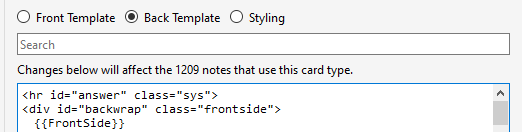
By the way, I noticed a slight regression after testing it with the latest Anki version on PC. The hr element has a 1px height now. It results in a visual layout shift while moving from the front side to the back side of the card.
1 Like
Thank you. I will try to include this in the next release, but in the meantime, putting
hr#answer {
    height: 0;
}
into the ⚙️ USER STYLES ⚙️ section should fix the layout.
v5.2 - Note Type Constructor
This update brings a card Constructor to the support add-on, allowing for a friendly way of customizing the template: changing fields and their labels, adjusting directions of testing and the types of the tests, keyboard layouts, color themes, etc.:
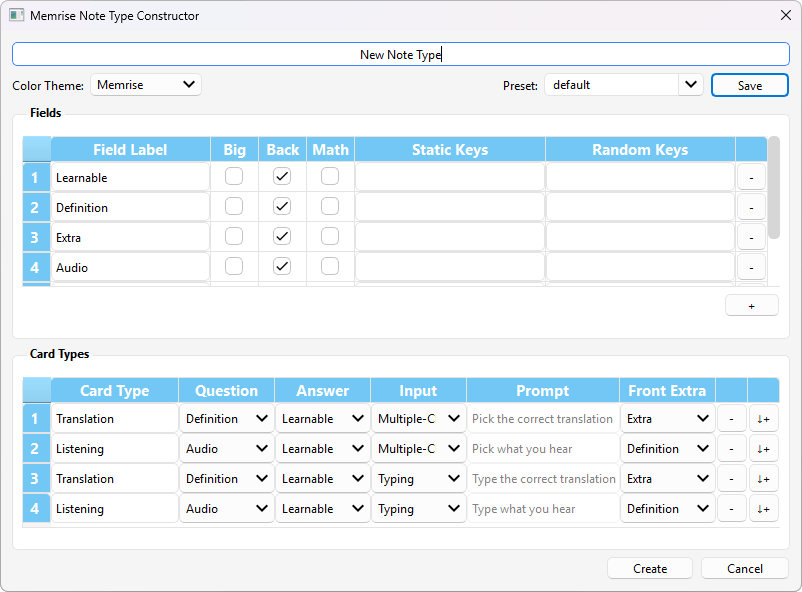
No more manual Field renaming and reordering is required, and there is an explicit bigger-font setting. Any unconventional test types, such as spelling exercises, should also be very easy to set up from now on.
The options are based on the Memrise community course properties and gather all the settings from multiple pages of the original site in a single place.


Creating Memrise Note Types
To make a new Memrise Note Type, go to Tools → New Memrise (Lτ) Note Type in the main Anki menu:

This will open a dialog with all the Memrise settings. Each option, when hovered, provides a hint, which indicates what original Memrise course setting it relates to:

(also see Memrise ↔ Anki glossary)
Keep in mind that selecting the “Multiple-Choice” option does not immediately generate Multiple-Choice Cards. It is still required to use the “Fill Choices” function after some Notes are created from a newly constructed Note Type.
Presets
There are several presets packaged with the add-on that can be used to get a general idea of different possible setups or to serve as a starting point for customization:

Customized setups can also be saved as new presets by typing a unique name into the Preset field and pressing Save. It is recommended to save every preset that has the potential of being reused or needing adjustments in the future. The creator dialog does not modify existing Note Types, because they might include customizations that go far beyond basic Memrise settings and cannot be fitted back into a predefined set of GUI options. If a preset is saved, adjustments to the Cards generated from it can be made by creating a new Note Type from a loaded and modified preset and then converting all cards with the Notes → Change Note Type command in the Anki Browser menu.
Minor changes to existing Note Types or changes not covered by the standard Memrise settings can still be made using the old way via the Anki Card Template Editor (example).
Having a saved preset will also simplify updating to newer versions of the template when they are released.
Functionally, all the cards generated using v5.2 template should remain the same as v5.1. Cloze Note Types are not currently available for generation using the UI and can only be manually customized from the respective template in the template Anki Deck.
2 Likes
Note that this was fixed in AnkiDroid 2.23 with the release of the New study screen. Enabling it in the settings fixes most of the AnkiDroid-specific bugs that appeared in earlier template versions (template version 4.2 and later should still work without any issues in both new and old study screens, including AnkiDroid versions earlier than 2.23). The New study screen, however, does not yet support all the features (autosubmitting and auto-rating answers, for example), so the current recommended configuration is using newer template versions (4.2 or later, which have built-in workaround for all the bugs) with the New study screen disabled.

Hi! Thanks so much for the add-on and just a small Q here. How can I make the ‘Extra’ field pop-out not crop my text?
1 Like
Add
.card-content.front {
    grid-template-rows: auto;
}
to the ⚙️ USER STYLES ⚙️ section at the bottom of the Styling tab. Keep in mind, however, that the variable height of this element will lead to jumps in the vertical position of the rest of the card on answer submission and when flipping to the next question.
Also a question, did you use the add-on interface to customize the names of your fields, or did you modify the HTML manually?
Hi, thanks for the help! Now it works very well!
I customize the names of the field within the anki ‘card’ tab
1 Like
Deck thumbnails and Memrise course styles
The older interface styling addon has been fully reworked and merged into the main support add-on. Now the main deck screen allows adding deck thumbnails, styling for Memrise levels converted into subdecks, and includes the means of controlling deck order on the home screen, modifying all provided interface styles or easily adding custom user styles and scripts to any Anki window (including individual Editor fields).

-
To attach a thumbnail to a deck, simply place an image file named
_thumb_%deckname%into yourcollection.mediafolder (can be quickly accessed viaTools→Check Media→View Files):- Image files are to be placed directly at the
collection.mediaroot, not inside any subfolder - If a deck is located inside another deck, the names of its parents should not be included in the thumbnail file name, only the name of the target deck itself
- Note that the add-on removes ordinal numbers from the start of the displayed deck names, so these numbers should not be included in the thumbnail file names.
For example, if a deck name is
1.2. Lesson 2and it is placed inside another deck called1. section A, the thumbnail name should be_thumb_Lesson 2. - Image files are to be placed directly at the
-
Image formats used by default for the thumbnails are listed in the
thumbnail extensionssetting in the add-on Config (Tools→Add-ons→ double click the “Memrise Cards Lt” name). The list can be simply extened by adding more formats, like.gifand.webp(including animated ones), but keep in mind that longer lists take more time to scan through when thumbnails are loaded and may ultimately lead to noticeable flickering when the deck screen is refreshed. For this reason, it is recommended to keep only the used formats in the list and remove any redundant ones.
-
Subdecks with the names starting with
Lfollowed by an ordinal number (e.g.,L05. particles) are interpreted as Memrise levels and automatically get appropriate icons on the main screen and deck overview screen: -
All styling described above can be disabled by changing
"deck styling"tofalsein the add-on Config. To also disable the feature that hides ordinal numbers from deck names, set"numbered decks"tofalseas well. Keeping"numbered decks": truealongside"deck styling": falseinstead allows controlling the deck order by prepending their names with appropriate numerals, without the numerals themselves being displayed and without any other style changes introduced by the add-on. -
The add-on css and js injecting functionality can be leveraged to add custom user styles and scripts to any Anki webview window. Simply place appropriately named files into the
user_filesdirectory inside the add-on folder (Tools→Add-ons→ select “Memrise Cards Lt” in the list →View Files):- General-use files and to be injected into every window:
common_styles.cssandcommon_scripts.js - Home screen and deck overview:
deck_styles.cssanddeck_scripts.js - Review screens, including card preview and card template editor:
reviewer_styles.cssandreviewer_scripts.js - Editor:
editor_styles.cssandeditor_scripts.js- To adjust the appearance depending on the Type of a Note being viewed, editor styles can take advantage of the “data-notetype” attribute attached to the
<body>element by the add-on
- To adjust the appearance depending on the Type of a Note being viewed, editor styles can take advantage of the “data-notetype” attribute attached to the
field_styles.cssfor styling content inside individual fields in the editor, e.g., word highlights or alternative answers. There is nofield_scripts.js, because they would be automatically hoisted by the JS engine to the root of the editor and thus equivalent toeditor_scripts.js
As an example, the add-on includes the style for Note Types made using the Memrise Note Type Constructor to be colored similarly to the Memrise community course editing page:
To remove this styling, delete the
editor_styles.csslocated in theuser_filesdirectory. - General-use files and to be injected into every window:
-
In general, the deck screen styles are more robust than in the Lstyle predecessor and, when enabled, overwrite changes of the deck names introduced by the Enhance Main Window and similar add-ons (shout-out to @Himawari).


1 Like
Thanks for your work! I haven’t used it yet… but maybe I will someday 
1 Like