I am learning Japanese and I found a deck for my text book with a new Deck type. My only issue was that I can not type in my answer in this deck, so I tried to change that by creating a new deck type from easy (type in) with all fields I need. While I now can type in my answer, anki doesn’t mark what I did correctly no matter what I do. I have downloaded the add on for japanese, included marking in the style of the cards space, read everything I could find. It still doesn’t work and I lose my progress all the time by trying to change that.
Assuming that by Deck type you actually mean Note Type, could you please clarify what is it that you need help with?
a) Do you want to modify the original Japanese Note Type you downloaded, converting it to a note type with typing cards?
b) Do you want help with something that doesn’t work on the Note Type you created yourself?
c) Are you looking for other Note Types/Add-ons that fit better a setup you are trying to achieve?
It is also not very clear what do you mean by Anki not marking what you did correctly?
a) Does it not show you which parts you typed correctly or not as a basic typing Anki cards are supposed to?
b) Do you expect the cards to be rated automatically but your Note Type doesn’t do that?
c) Or maybe you found a note type/ add-on that does the automatic rating, but the grades do not match your expectations?
There are many other questions you can answer to help understand what you are trying to achieve and what the issue you have: what you mean by losing progress? Number of your learned cards? Learning steps? Reviews themselves? Where do you look to see that it was lost?
You could also provide a link to the Japanese add-on you are referring to and some screenshots of your card reviews and template code relevant to the problem.
Yes, I do mean note type, sorry. The deck I found for the text book had a specific not type with 5 fields: Id, Furigana, English, Kanji and Audio. The deck is good but I learn way better if I can type an answer in. I watched tutorials, created a new note type from “type in answer" note type with 5 fields and changed the deck’s cards to that note type mapping the types of the new deck to the previous ones.
This allows me to type in the answer but I get issue a), it doesn’t show me what I typed and doesn’t mark anything green or red. I tried installing several add ons for japanese that I can’t recall (sorry) but nothing changed. I tried changing the fields specifically to front and back (English and Furigana) and I also did everything again to check if I really chose the type in note type as a base.
Every time I change the note type of the stack, it has to be uploaded and downloaded anew from laptop app to web to phone app, so anki forgets what I have already done with this deck in regard to studying it.
Add-ons are a desktop feature solely. They do not sync between platforms, and they will not and are not supposed to affect your experience on AnkiDroid in any way.
If you want your reviews on mobile to survive a one-way sync from desktop, you need to do a regular two-way sync between all platforms (mobile ↔ AnkiWeb, then desktop ↔ AnkiWeb) prior to making any global changes in the desktop app, like swapping Note Types of cards. One-way sync required by such changes is intended to only leave info from one of the platforms, so naturally, it overwrites anything on your mobile that wasn’t completely synced beforehand (you should be getting warnings about that when attempting any actions that might cause desynchronization).
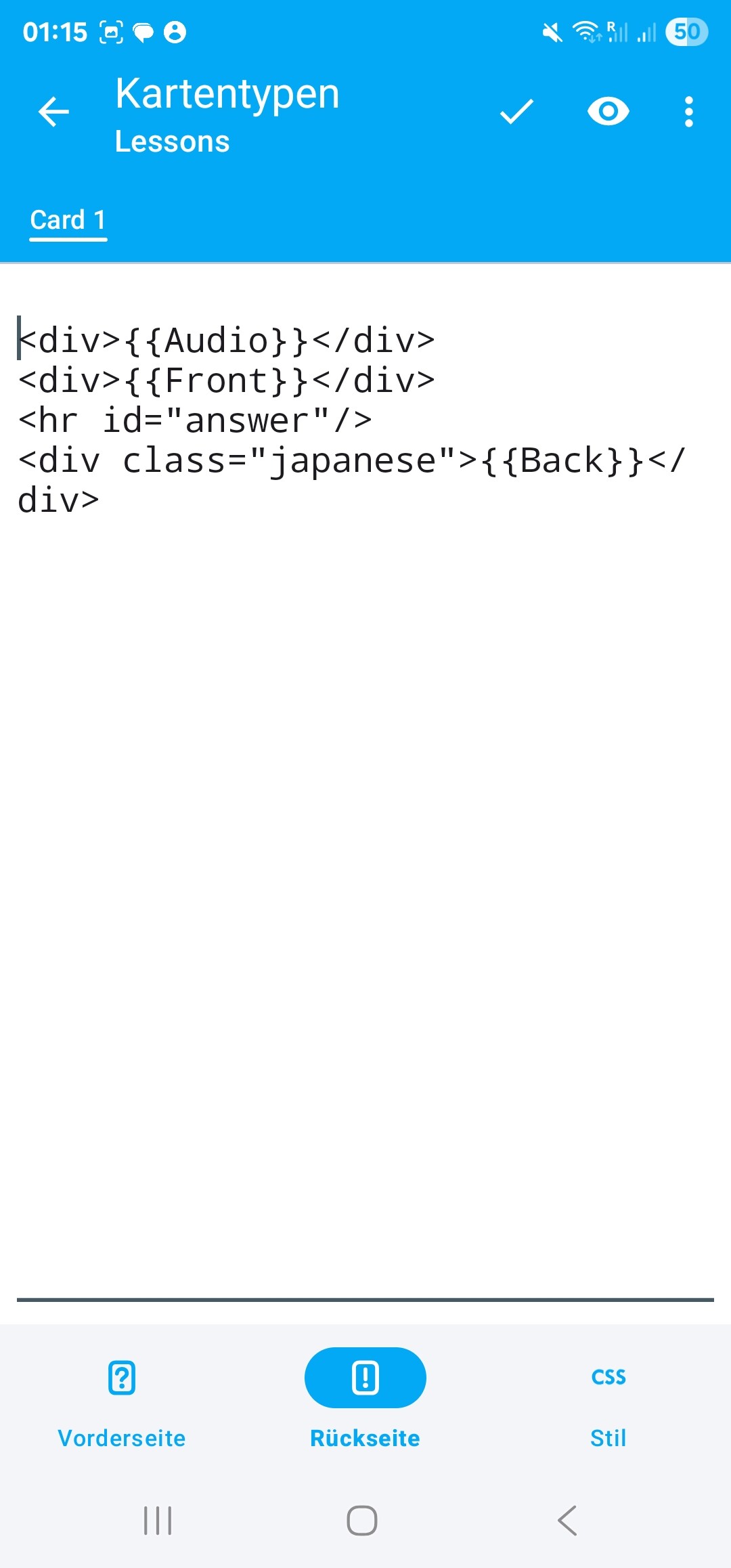
As for the issue itself, it seems you only need to change {{Back}} on the backside of your card template to {{type:Back}}in addition to what you already modified on the front. Right now, you don’t have a typing element on the back, so, naturally, you don’t see the typed answer and its highlights there.
If you don’t create any new Note Types and only modify the existing template, it won’t even require one-way syncs, and you can do it on any platform.
Thank you very much. I will definitely do that in the future.
I added type. I still had to remove the color information from Style to go from the first Screenshot to the second, if you are curious. But now everything works.