The card became blank after clicking “Show Answer”. The bottom bar did show the “Again, Hard, Good, Easy” pop-up. I tried to follow the bot’s instructions (changing video driver, debugging, updating the laptop graphic driver, disable all add on… etc) but nothing seems to work.
Card became blank after clicking "Show Answer". Bottom bar did show "Again, Hard, Good, Easy" pop up

I have two ideas:
- Your back template might be empty / hiding your fields and other html elements with css.
- The card isn’t actually empty. I can see a scrollbar, so maybe all you have to do is scroll down. If that was the issue, we can probably solve that, too.
The Anki menu bar at the top appears to be missing as well, so it might be not a card template issue.
What bot, dear?
I’d like to see you try the Troubleshooting Checklist – especially #2 safe mode, and #6 video drivers (as explained there – because I don’t know if whatever bot that was gave you correct instructions).
Oh, that’s just me choosing to hide the top bar. Sorry for the confusion.
I posted the issue on ankihub. On the website, I was following the Ankihub AI Bot’s instruction and ran a series of testing and tried to trouble shooting all the possibilities that might have causing the problem. So basically I’ve already went through the entire troubleshooting checklist if not more than that (including reinstallation Anki multiple time. I actually flashed my entire laptop hard drive and reinstalled the entire window 11 system. Nothing works out so the AI Bot suggest me to reach out to the anki forum.
Oh yes, the back of the card did pop out after I scroll down! However, is there a way to prevent this to happen over and over again without scrolling down and ultimately solving the problem? I’m using the Anking deck for my upcoming board exam and I don’t see other people experiencing the same problem as I do.
You should probably provide the code for the card you are using (pasting it here using a code block, marked with ``` is preferred). An example of the fields’ contents might prove useful as well.
I’m sorry, would you mind walking me through how I can get the code for the card, please? I don’t know where to acess the code.
I think I found it.
Front template:
<!-- version a82ea8d -->
<div id="text">{{cloze:Text}}</div>

<br>

<!-- ##############  Text-to-speech  ##############
replace the arrows/dashes from the statement below with double curly brackets-->

<!--tts en_US voices=Apple_Samantha,Microsoft_Zira speed=1.4:cloze:Text -->


<script>
// ############## USER CONFIGURATION START ##############
// Auto flip to back when One by one mode.
var autoflip = false

// Timer config (timer length, timer finished message)
var minutes = 0
var seconds = 9
var timeOverMsg = "<span style='color:#CC5B5B'>!<br/>!<br/>!<br/>!<br/>!<br/>!</span>"

// ##############  TAG SHORTCUT  ##############
var toggleTagsShortcut = "C";

// ENTER THE TAG TERM WHICH, WHEN PRESENT, WILL TRIGGER A RED BACKGROUND
var tagID = "XXXYYYZZZ"

// WHETHER THE WHOLE TAG OR ONLY THE LAST PART SHOULD BE SHOWN

var numTagLevelsToShow = 0;


// ##############  CLOZE ONE BY ONE  ##############
var revealNextShortcut = "N"
var revealNextWordShortcut = "Shift + N"
var toggleAllShortcut = ","

// Changes how "Reveal Next" and clicking behaves. Either "cloze" or "word".
// "word" reveals word by word.
var revealNextClozeMode = "cloze"

// What cloze is hidden with
var clozeHider = (elem) => "👑"
/*
You can replace the above line with below examples. '█' or '_' works well for hiding clozes.

// Fixed length:
var clozeHider = (elem) => "███"
// Replace each character with "█":
var clozeHider = (elem) => "█".repeat(elem.textContent.length)
// Show whitespaces:
var clozeHider = (elem) => "[" + elem.textContent.split(" ").map((t) => "█".repeat(t.length)).join(" ") + "]"
// Color-filled box (doesn't hide images):
var clozeHider = (elem) => `<span style="background-color: red; color: transparent;">${elem.innerHTML}</span>`
*/

// enables selective cloze one-by-one (e.g. only c1 and c3)
// seperate wanted numbers by "," in one-by-one field
var selectiveOneByOne = true;
// if selective one-by-one is disabled, set this to select a min number of clozes necessary to activate 1b1
// can be set to any number to set lower bound, any falsy value (e.g. 0 or null) disables this setting
var minNumberOfClozes = 0;


// ############## USER CONFIGURATION END ##############
</script>

<!-- Credit: Anki Persistence, MIT: https://github.com/SimonLammer/anki-persistence/blob/8190116c95df202773aa692c5e9ae704fb407bc9/script.js -->

<script>
if (typeof(window.Persistence) === 'undefined') {
  var _persistenceKey = 'github.com/SimonLammer/anki-persistence/';
  var _defaultKey = '_default';
  window.Persistence_sessionStorage = function() { // used in android, iOS, web
    var isAvailable = false;
    try {
      if (typeof(window.sessionStorage) === 'object') {
        isAvailable = true;
        this.clear = function() {
          for (var i = 0; i < sessionStorage.length; i++) {
            var k = sessionStorage.key(i);
            if (k.indexOf(_persistenceKey) == 0) {
              sessionStorage.removeItem(k);
              i--;
            }
          };
        };
        this.setItem = function(key, value) {
          if (value == undefined) {
            value = key;
            key = _defaultKey;
          }
          sessionStorage.setItem(_persistenceKey + key, JSON.stringify(value));
        };
        this.getItem = function(key) {
          if (key == undefined) {
            key = _defaultKey;
          }
          return JSON.parse(sessionStorage.getItem(_persistenceKey + key));
        };
        this.removeItem = function(key) {
          if (key == undefined) {
            key = _defaultKey;
          }
          sessionStorage.removeItem(_persistenceKey + key);
        };
        this.getAllKeys = function () {
          var keys = [];
          var prefixedKeys = Object.keys(sessionStorage);
          for (var i = 0; i < prefixedKeys.length; i++) {
            var k = prefixedKeys[i];
            if (k.indexOf(_persistenceKey) == 0) {
              keys.push(k.substring(_persistenceKey.length, k.length));
            }
          };
          return keys.sort()
        }
      }
    } catch(err) {}
    this.isAvailable = function() {
      return isAvailable;
    };
  };
  window.Persistence_windowKey = function(persistentKey) { // used in windows, linux, mac
    var obj = window[persistentKey];
    var isAvailable = false;
    if (typeof(obj) === 'object') {
      isAvailable = true;
      this.clear = function() {
        obj[_persistenceKey] = {};
      };
      this.setItem = function(key, value) {
        if (value == undefined) {
          value = key;
          key = _defaultKey;
        }
        obj[_persistenceKey][key] = value;
      };
      this.getItem = function(key) {
        if (key == undefined) {
          key = _defaultKey;
        }
        return obj[_persistenceKey][key] == undefined ? null : obj[_persistenceKey][key];
      };
      this.removeItem = function(key) {
        if (key == undefined) {
          key = _defaultKey;
        }
        delete obj[_persistenceKey][key];
      };
      this.getAllKeys = function () {
        return Object.keys(obj[_persistenceKey]);
      }

      if (obj[_persistenceKey] == undefined) {
        this.clear();
      }
    }
    this.isAvailable = function() {
      return isAvailable;
    };
  };
  /*
   *   client  | sessionStorage | persistentKey | useful location |
   * ----------|----------------|---------------|-----------------|
   * web       |       YES      |       -       |       NO        |
   * windows   |       NO       |       py      |       NO        |
   * android   |       YES      |       -       |       NO        |
   * linux 2.0 |       NO       |       qt      |       YES       |
   * linux 2.1 |       NO       |       qt      |       YES       |
   * mac 2.0   |       NO       |       py      |       NO        |
   * mac 2.1   |       NO       |       qt      |       YES       |
   * iOS       |       YES      |       -       |       NO        |
   */
  window.Persistence = new Persistence_sessionStorage(); // android, iOS, web
  if (!Persistence.isAvailable()) {
    window.Persistence = new Persistence_windowKey("py"); // windows, mac (2.0)
  }
  if (!Persistence.isAvailable()) {
    var titleStartIndex = window.location.toString().indexOf('title'); // if titleStartIndex > 0, window.location is useful
    var titleContentIndex = window.location.toString().indexOf('main', titleStartIndex);
    if (titleStartIndex > 0 && titleContentIndex > 0 && (titleContentIndex - titleStartIndex) < 10) {
      window.Persistence = new Persistence_windowKey("qt"); // linux, mac (2.1)
    }
  }
}
</script>


<!-- Credit: Code for selective 1b1 clozes is adapted from the Ankizin project: https://ankiweb.net/shared/info/2058530482 -->

<!-- CLOZE ONE BY ONE FRONT -->
<div id="one-by-one" style="display: none;">{{One by one}}</div>

<script>
  // enables cloze one-by-one even when one-by-one field is empty
  // minNumberOfClozes is still considered in this case
  // overridden in importance by selectiveOneByOne
  var alwaysOneByOne = false;
  var clozeOneByOneEnabled = true;
  var oneByOneFieldNotEmpty = document.getElementById("one-by-one").textContent !== "";
    clozeOneByOneEnabled = alwaysOneByOne || oneByOneFieldNotEmpty;

  var clozeHints = [];
  if (clozeOneByOneEnabled) {
    document.getElementById("qa").classList.add('one-by-one');
    // Save cloze hints to display in the back
    let clozes = document.getElementsByClassName("cloze")
    for(var i = 0; i < clozes.length; i++) {
      clozes[i].classList.add("one-by-one");
      if (clozes[i].innerHTML === "[...]") {
        clozeHints.push("")
      } else {
        clozeHints.push(clozes[i].innerHTML)
      }
    }

    // --- CHECK IF ONE BY ONE SHOULD BE ENABLED FOR THIS SPECIFIC CARD ---
    /**
     * Credit for the getCardNumber function goes to foenixx (GitHub) / ollevolle (AnkiWeb Forum)
     */
     const getCardNumber = function () {
      clz = document.body.className;
      const regex = /card(\d+)/gm;
      let m;

      if ((m = regex.exec(clz)) !== null) {
        return m[1];
      } else {
        // Should only fire if card is not cloze
        console.error("Cannot find cardN class of body element!");
        return "0";
      }
    }

    function processSelective1b1() {
      // parse the cloze numbers for which selectiveOneByOne is enabled
      var clozeNumbers = document.getElementById("one-by-one").textContent.split(',').filter(element => element).map(Number)
      var cardNumberIsOneByOne = !clozeNumbers.filter(n => !Number.isNaN(n)).length || clozeNumbers.includes(parseInt(getCardNumber()))

      // check the amount of clozes -> disable OneByOne if less than minimum value wanted (minNumberOfClozes)
      var numClozesForNumber = (minNumberOfClozes) ? document.querySelectorAll('.clozefield .cloze').length : 0

      // stop OneByOne if selectiveOneByOne is not enabled for this specific card OR if OneByOne is disabled some other way
      // -> show normal backside
      if (!alwaysOneByOne && ((selectiveOneByOne && !cardNumberIsOneByOne) || (oneByOneFieldNotEmpty && (numClozesForNumber < minNumberOfClozes)))) {
        clozeOneByOneEnabled = false
      }

      if (autoflip && clozeOneByOneEnabled) {

    if(window.pycmd || window.showAnswer) {
        // avoid flickering. Must unset this in the back.
        document.getElementById("qa").style.display = "none";
    }

    if (window.pycmd) {
        pycmd("ans")
    } else if (window.showAnswer) {
        showAnswer()
    }
}
// AnkiMobile JS API doesn't have one for show answer.
// Best alternative is to use Taps/Swipes to show answer.
    }

    function delayedProcessSelective1b1() {
      if (window.requestAnimationFrame) window.requestAnimationFrame(processSelective1b1); // less flickering
      else window.setTimeout(processSelective1b1, 0);
    };
    if (globalThis.onUpdateHook) {
      onUpdateHook.push(delayedProcessSelective1b1);
    }
    else if (document.readyState === "complete") {
        delayedProcessSelective1b1();
    }
    else {
      document.addEventListener("DOMContentLoaded", delayedProcessSelective1b1);
    }
  }
  Persistence.setItem("clozeHints", clozeHints);
</script>

<!-- NOT-PERSISTING EVENT LISTENER -->
<script>
  if (window.ankingEventListeners) {
    for (const listener of ankingEventListeners) {
      const type = listener[0]
      const handler = listener[1]
      document.removeEventListener(type, handler)
    }
  }
  window.ankingEventListeners = []

  window.ankingAddEventListener = function(type, handler) {
    document.addEventListener(type, handler)
    window.ankingEventListeners.push([type, handler])
  }
</script>

<!-- Shortcut Matcher Function -->
<script>
  var specialCharCodes = {
    "-": "minus",
    "=": "equal",
    "[": "bracketleft",
    "]": "bracketright",
    ";": "semicolon",
    "'": "quote",
    "`": "backquote",
    "\\": "backslash",
    ",": "comma",
    ".": "period",
    "/": "slash",
  };
  // Returns function that match keyboard event to see if it matches given shortcut.
  function shortcutMatcher(shortcut) {
    let shortcutKeys = shortcut.toLowerCase().split(/[+]/).map(key => key.trim())
    let mainKey = shortcutKeys[shortcutKeys.length - 1]
    if (mainKey.length === 1) {
      if (/\d/.test(mainKey)) {
        mainKey = "digit" + mainKey
      } else if (/[a-zA-Z]/.test(mainKey)) {
        mainKey = "key" + mainKey
      } else {
        let code = specialCharCodes[mainKey];
        if (code) {
          mainKey = code
        }
      }
    }
    let ctrl = shortcutKeys.includes("ctrl")
    let shift = shortcutKeys.includes("shift")
    let alt = shortcutKeys.includes("alt")

    let matchShortcut = function (ctrl, shift, alt, mainKey, event) {
      if (mainKey !== event.code.toLowerCase()) return false
      if (ctrl !== (event.ctrlKey || event.metaKey)) return false
      if (shift !== event.shiftKey) return false
      if (alt !== event.altKey) return false
      return true
    }.bind(window, ctrl, shift, alt, mainKey)

    return matchShortcut
  }
</script>

<!-- IMAGE BLUR -->
<script>
    for (const image of document.querySelectorAll(".blur")) {
        image.classList.add("tappable");
        image.addEventListener("click", () => {
            image.classList.toggle("blur");
        });
    }
</script>


<!-- BEGIN WRAPPER CODE shuffle -->

<script>
    (() => {
        const selectors = [".shuffle"];
        const shuffleMap = Persistence.getItem("shuffle") || {};
        const shuffledWordClass = "shuffled-word";

        function isFront() {
            const hasHrMarker = document.querySelector("hr[id=answer]");
            const hasClozeFieldClass = document.querySelector(".clozefield");
            return !hasHrMarker && !hasClozeFieldClass;
        }

        function shuffle(array, indexMap) {
            let currentIndex = array.length;
            while (currentIndex != 0) {
                currentIndex--;
                let randomIndex = indexMap[currentIndex] !== undefined ? indexMap[currentIndex] : Math.floor(Math.random() * (currentIndex + 1));
                indexMap[currentIndex] = randomIndex;
                [array[currentIndex], array[randomIndex]] = [
                    array[randomIndex],
                    array[currentIndex],
                ];
            }
        }

        function shuffleElements(elements) {
            elements = elements.filter(e => !e.matches(".no-shuffle *"));
            const shuffledElements = Array.from(
                elements.map((el) => el.cloneNode(true))
            );
            if (shuffledElements.length === 0) {
                return;
            }
            // Assuming elements[0] is not also the first element in a different list to shuffle
            const indexMap = shuffleMap[elements[0]] || {};
            shuffle(shuffledElements, indexMap);
            shuffleMap[elements[0]] = indexMap;
            for (let i = 0; i < elements.length; i++) {
                elements[i].replaceWith(shuffledElements[i]);
            }
        }

        function shuffleList(listElement) {
            const items = Array.from(listElement.querySelectorAll("li"));
            shuffleElements(items);
        }

        /**
         * Shuffle words connected by "and" or "or".
         * e.g. "fluoroquinolones, macrolides, and ketoconazole"
         **/
        function shuffleSentences(element) {
            const innerHTML = element.innerHTML;

            const connectorMatch = innerHTML.match(/\s+(and|or)\s+([^,]+)$/i);
            if (!connectorMatch) {
                return;
            }

            const connector = connectorMatch[1];
            const lastItem = connectorMatch[2].trim();
            const beforeConnector = innerHTML.substring(0, innerHTML.lastIndexOf(connectorMatch[0]));
            const items = [];
            let currentItem = '';
            let tagDepth = 0;
            let inTag = false;

            for (let i = 0; i < beforeConnector.length; i++) {
                const char = beforeConnector[i];

                if (char === '<') {
                    inTag = true;
                    if (beforeConnector[i + 1] !== '/') {
                        tagDepth++;
                    } else {
                        tagDepth--;
                    }
                } else if (char === '>') {
                    inTag = false;
                }

                if (char === ',' && !inTag && tagDepth === 0) {
                    if (currentItem.trim()) {
                        items.push(currentItem.trim());
                    }
                    currentItem = '';
                } else {
                    currentItem += char;
                }
            }

            if (currentItem.trim()) {
                items.push(currentItem.trim());
            }

            items.push(lastItem);

            if (items.length < 2) {
                return;
            }

            const cleanedItems = items.map(item => {
                return item.replace(/,\s*(?=<\/|$)/g, '');
            });

            const indexMap = shuffleMap[element] || {};

            const itemsToShuffle = [...cleanedItems];
            shuffle(itemsToShuffle, indexMap);
            shuffleMap[element] = indexMap;

            let newHTML;
            if (itemsToShuffle.length === 2) {
                newHTML = `${itemsToShuffle[0]} ${connector} ${itemsToShuffle[1]}`;
            } else {
                const allButLast = itemsToShuffle.slice(0, -1);
                const last = itemsToShuffle[itemsToShuffle.length - 1];
                newHTML = `${allButLast.join(', ')}, ${connector} ${last}`;
            }

            element.innerHTML = newHTML;
        }

        for (const selector of selectors) {
            for (const container of document.querySelectorAll(selector)) {
                if (["UL", "OL"].includes(container.tagName)) {
                    shuffleList(container);
                }
                for (const parentElement of container.querySelectorAll(
                    "ol, ul"
                )) {
                    shuffleList(parentElement);
                }
                const images = Array.from(container.querySelectorAll("img"));
                shuffleElements(images);
            }
        }
        for (const element of document.querySelectorAll(".shuffle-sentence")) {
            shuffleSentences(element);
        }

        if (isFront()) {
            Persistence.setItem("shuffle", shuffleMap);
        } else {
            Persistence.removeItem("shuffle");
        }
    })();
</script>

<!-- END WRAPPER CODE -->


<!-- COUNTDOWN TIMER -->
<div class="timer" id="s2"></div>
<script>
  function countdown(elementName, minutes, seconds) {
    var element, endTime, mins, msLeft, time;
    function twoDigits( n ) {
      return (n <= 9 ? "0" + n : n);
    }
    function updateTimer() {
      msLeft = endTime - (+new Date);

      if ( msLeft < 1000 ) {
        element.innerHTML = timeOverMsg;
      } else {
        time = new Date( msLeft );
        mins = time.getUTCMinutes();
        element.innerHTML = mins + ':' + twoDigits(time.getUTCSeconds());
        setTimeout( updateTimer, time.getUTCMilliseconds() + 500 );
      }
    }
    element = document.getElementById(elementName);
    endTime = (+new Date) + 1000 * (60*minutes + seconds) + 500;
    updateTimer();
  }
  countdown("s2", minutes, seconds ); //2nd value is the minute, 3rd is the seconds
</script>


<!-- ANKING HYPERLINK IMAGE -->
<a href="https://www.ankingmed.com"><img src="_AnKingIcon.png" alt="The AnKing" id="pic"></a>


<script>
    //DONT FADE BETWEEN CARDS
	qFade=0; if (typeof anki !== 'undefined') anki.qFade=qFade;
</script>

<!-- CLICKABLE COLORFUL TAGS -->
{{#Tags}}
<div id="tags-container">{{clickable::Tags}}</div>
<script>
  var tagContainer = document.getElementById("tags-container")
  var tagList;
  if (tagContainer.childElementCount == 0) {
    tagList = tagContainer.innerHTML.split(" ");
    var kbdList = [];
    var newTagContent = document.createElement("div");

    for (var i = 0; i < tagList.length; i++) {
      var newTag = document.createElement("kbd");
      var tag = tagList[i];
      // numTagLevelsToShow == 0 means the whole tag should be shown
      if(numTagLevelsToShow != 0){
        tag = tag.split('::').slice(-numTagLevelsToShow).join("::");
      }
      newTag.innerHTML = tag;
      newTagContent.append(newTag)
    }
    tagContainer.innerHTML = newTagContent.innerHTML;
    tagContainer.style.cursor = "default";
  }
  else {
    tagList = Array.from(tagContainer.children).map(e => e.innerText);
  }
  globalThis.tagList = tagList.map(t => t.trim().toLowerCase());
  if (tagContainer.innerHTML.indexOf(tagID) != -1) {
    tagContainer.style.backgroundColor = "rgba(251,11,11,.15)";
  }

  function showtags() {
    var tagContainerShortcut = document.getElementById("tags-container");

    if (tagContainerShortcut.style.display
      === "none") {
      tagContainerShortcut.style.display = "block";
    } else {
      tagContainerShortcut.style.display =
        "none";
    }
  }

  var isShortcut = shortcutMatcher(toggleTagsShortcut)
  ankingAddEventListener('keyup', function (e) {
      if (isShortcut(e)) {
          showtags();
      }
  });

</script>
{{/Tags}}

<!-- BEGIN ANKIHUB MODFICATIONS -->
{{#ankihub_id}}
    <div id="ankihub-note-id" hidden>{{ankihub_id}}</div>
{{/ankihub_id}}
<div id="ankihub-user-id" hidden></div>
<!-- END ANKIHUB MODFICATIONS -->

<!--
ANKIHUB_END
Text below this comment will not be modified by AnkiHub or AnKing add-ons.
Do not edit or remove this comment if you want to protect the content below.
-->
<script type="module" src="https://content-gateway.us.production.amboss.com/amboss.js" data-addon="eyJhbm9uSWQiOiAiOGRjNjU4ODctNjQ1ZC00MzZlLTg0ZjktOTAzNTRmNGE2ZmY0IiwgInVzZXJJZCI6ICJ4S1VmYUVpVmxQIiwgInRva2VuIjogImV5SmhiR2NpT2lKU1V6VXhNaUlzSW5SNWNDSTZJa3BYVkNKOS5leUpsZUhBaU9qRTNOak16T1RJd01EQXNJbWx6Y3lJNklrRk5RazlUVXlJc0luTjFZaUk2SW5oTFZXWmhSV2xXYkZBaUxDSnBZWFFpT2pFM05qQTRNREF3TURCOS5hRXZVQ0dZVFJCNVNwOEF6Yks1Sk9jTldidDRXUW5KeER4eVJfaTJwVC1iUWNUSlBOT3JVcUQzb3RaTklrOHNwbWItR2VWclBXS2YxN3AzelBTNEZXdjZqVXR0b2pkaHpWdjd4RE9hSktacU56eWJ3TkpBLUpfaFo5RHk4RzlVNlZlSWUzSVNrb0lIdVhtQzBIbVo2ZmRfU1ZvcjRzMXhQWkRrQkhxaWZIbHNtNTFlUzBDZFlaNndxTmFoWXdVQkhXdy1xMjN1NzVhUVJOTGV1QlJpaGdZWHJ6eTBTbVI1LUtFQTJ5bGlqNkxUelB4WExDMDBIWFRWWEpyRXQ5OGNHRVE5V1BJNm11b1VpS1BobnV1dmc4ZllCM1FOU05TTWdiSVBLN2JURGtUOTl0QnBTNENmYTZyT0l4LVJ0UDZhZVl6UXg4T1VpS1N1dkNBNVZEdFhVVVEifQ==" id="amboss-snippet"></script>
I tried to get the back template as well but it said it’s over the limited character that’s allow to post on here.
You can try splitting it into several posts (if it will take a reasonable number of them), or sharing a whole note (you can export a card using File → Export into a file and upload it somewhere like google drive).
Although, most relevant bit is likely to be located at the top, so for a start you can try posting everything from the back template before the first <script> tag. The styling code will also be needed to see how it affects the display.
Back (before the frist script tag:
<!-- version a82ea8d -->
<script>
// ##############  HINT REVEAL SHORTCUTS  ##############
// All shortcuts will also open with "H" if using the Hint Hotkeys add-on
var ButtonShortcuts = {
    "Lecture Notes" : "Alt + 1",
    "Missed Questions" : "Alt + 2",
    "Pathoma" : "Alt + 3",
    "Boards and Beyond Links" : "",
    "Boards and Beyond" : "Alt + 4",
    "First Aid Links" : "",
    "First Aid" : "Alt + 5",
    "Sketchy" : "Alt + 6",
    "Sketchy 2": "",
    "Sketchy Extra": "",
    "Picmonic": "",
    "Pixorize" : "Alt + 7",
    "Physeo" : "Alt + 8",
    "Bootcamp" : "Alt + F2",
    "OME" : "Alt + F1",
    "Additional Resources" : "Alt + 9",
}
var ToggleAllButtonsShortcut = "'"
var ToggleNextButtonShortcut = "H";
// ##############  SHOW HINTS AUTOMATICALLY  ##############
var ButtonAutoReveal = {
    "Lecture Notes" : false,
    "Missed Questions" : false,
    "Pathoma" : false,
    "Boards and Beyond" : false,
    "Boards and Beyond Links" : false,
    "First Aid" : false,
    "First Aid Links" : false,
    "Sketchy" : false,
    "Sketchy 2": false,
    "Sketchy Extra": false,
    "Picmonic": false,
    "Pixorize" : false,
    "Physeo" : false,
    "Bootcamp" : false,
    "OME" : false, // not currently a button
    "Additional Resources" : false,
}

var ScrollToButton = true;

// ##############  TAG SHORTCUT  ##############
var toggleTagsShortcut = "C";

// ENTER THE TAG TERM WHICH, WHEN PRESENT, WILL TRIGGER A RED BACKGROUND
var tagID = "XXXYYYZZZ"

// WHETHER THE WHOLE TAG OR ONLY THE LAST PART SHOULD BE SHOWN

var numTagLevelsToShow = 0;


// ##############  CLOZE ONE BY ONE  ##############
var revealNextShortcut = "N"
var revealNextWordShortcut = "Shift + N"
var toggleAllShortcut = ","

// Changes how "Reveal Next" and clicking behaves. Either "cloze" or "word".
// "word" reveals word by word.
var revealNextClozeMode = "cloze"

// What cloze is hidden with
var clozeHider = (elem) => "👑"
/*
You can replace the above line with below examples. '█' or '_' works well for hiding clozes.

// Fixed length:
var clozeHider = (elem) => "███"
// Replace each character with "█":
var clozeHider = (elem) => "█".repeat(elem.textContent.length)
// Show whitespaces:
var clozeHider = (elem) => "[" + elem.textContent.split(" ").map((t) => "█".repeat(t.length)).join(" ") + "]"
// Color-filled box (doesn't hide images):
var clozeHider = (elem) => `<span style="background-color: red; color: transparent;">${elem.innerHTML}</span>`
*/

// enables selective cloze one-by-one (e.g. only c1 and c3)
// seperate wanted numbers by "," in one-by-one field
var selectiveOneByOne = true;
// if selective one-by-one is disabled, set this to select a min number of clozes necessary to activate 1b1
// can be set to any number to set lower bound, any falsy value (e.g. 0 or null) disables this setting
var minNumberOfClozes = 0;
Styling:
/*    ANKINGOVERHAUL   */

/* The AnKing wishes you the best of luck! Be sure to check out our YouTube channel and Instagram
 for all things Anki and Med School related (including how to customize this card type and use these decks):
		www.AnKingMed.com
			@ankingmed
*/

/*#########################################################
################  USER CUSTOMIZATION START  ##############*/
/* You can choose colors at www.htmlcolorcodes.com */

/* TIMER ON/OFF */
.timer {
  display: block;
  /* ‘none’ or ‘block’ */
}

/* TAGS ON/OFF DESKTOP & MOBILE*/
#tags-container {
  display: none;
  /* ‘none’ or ‘block’ */
}

.mobile #tags-container {
  display: none;
  /* ‘none’ or ‘block’ */
}

/* MOVE TAGS UP FOR 'NO-DISTRACTIONS' ADD-ON */
#tags-container {
  padding-bottom: 0px;
  /* 0 normal, 55 to move up */
}


/*~~~~~~~~~FONT SIZE~~~~~~~~~*/
/*NOTE: anything with 'px' will keep a font that size indefinitely,
'rem' is a fraction of this size above and allows all text to change size with the above setting */
/* Desktop */
html {
  font-size: 28px;
}

/* Mobile */
.mobile {
  font-size: 28px;
}

/*IPAD ADJUSTMENTS (currently not applied)
.ipad .card,
.ipad #extra {
  font-size: 28px;
}
.ipad .hints {
  font-size: 24px;
}
.ipad #firstaid,
.ipad #sketchy,
.ipad #sketchy2,
.ipad #sketchyextra,
.ipad #picmonic,
.ipad #pixorize,
.ipad #physeo,
.ipad #additional {
  font-size: 20px !important;
}
*/

/*REVEALED HINTS FONT SIZE*/
.hints {
  font-size: .85rem;
}

/*Other Fields Font Size*/
#firstaid,
#sketchy,
#sketchy2,
#sketchyextra,
#picmonic,
#pixorize,
#physeo,
#additional {
  font-size: .6rem !important;
}

/*Other Fields Font Size on Mobile*/
.mobile #firstaid,
.mobile #sketchy,
.mobile #sketchy2,
.mobile #sketchyextra,
.mobile #picmonic,
.mobile #pixorize,
.mobile #physeo,
.mobile #additional {
  font-size: 20px !important;
}

/*~~~~~~~~~FONT STYLE~~~~~~~~~*/
.card,
kbd {
  font-family: Arial Greek, Arial;
  /*Step exam's font is Arial Greek*/
}

/*~~~~~~~MAX IMAGE HEIGHT/WIDTH~~~~~~~*/
img {
  max-width: 85%;
  max-height: 100%;
}

/* #extra img,
#notes img,
#missed img,
#pathoma img,
#bnb img {
  max-width: 85%;
} */

#firstaid img,
#sketchy img,
#sketchy2 img,
#sketchyextra img,
#picmonic img,
#pixorize img,
#physeo img,
#additional img {
  max-width: 60%;
}


/*~~~~~~~~~COLORS~~~~~~~~~/
/* Default Text Color */
.card {
  color: black;
}

/* Background Color */
.card {
  background-color: #D1CFCE;
}

/* Cloze Color */
.cloze, .cloze b, .cloze u, .cloze i {
  color: blue;
}

/* One by One Cloze Color */
.cloze.one-by-one, .cloze.one-by-one b, .cloze.one-by-one u, .cloze.one-by-one i {
  color: #009400;
}

/* One by One Cloze Hint Color */
.cloze-hint, .cloze-hint b, .cloze-hint u, .cloze-hint i {
  color: #009400;
}

/* "Extra" Field Color */
#extra, #extra i {
  color: navy;
}

/* Hint Reveal Color */
.hints {
  color: #4297F9;
}

/* Missed Questions Hint Reveal Color */
#missed {
  color: red;
}

/* Timer Countdown Color */
.timer {
  color: transparent;
}

/* Empty Link Color */
a:not([href]),
a[href^="javascript:"] {
  text-decoration: none;
  color: inherit;
}


/*~~~~~~~~NIGHT MODE COLORS~~~~~~~~*/
/* NM Default Text Color */
.nightMode.card,
.night_mode .card {
  color: #FFFAFA !important;
}

/* NM Background Color */
.nightMode.card,
.night_mode .card {
  background-color: #272828 !important;
}

/* NM Cloze Color */
.nightMode .cloze, .nightMode .cloze b, .nightMode .cloze u, .nightMode .cloze i,
.night_mode .cloze, .night_mode .cloze b, .night_mode .cloze u, .night_mode .cloze i {
  color: #4297F9 !important;
}

/* NM One by One Cloze Color */
.nightMode .cloze.one-by-one, .nightMode .cloze.one-by-one b, .nightMode .cloze.one-by-one u, .nightMode .cloze.one-by-one i,
.night_mode .cloze.one-by-one, .night_mode .cloze.one-by-one b, .night_mode .cloze.one-by-one u, .night_mode .cloze.one-by-one i {
    color: #009400 !important;
}

/* NM One by One Cloze Hint Color */
.nightMode .cloze-hint, .nightMode .cloze-hint b, .nightMode .cloze-hint u, .nightMode .cloze-hint i,
.night_mode .cloze-hint, .night_mode .cloze-hint b, .night_mode .cloze-hint u, .night_mode .cloze-hint i {
    color: #009400 !important;
}

/* NM "Extra" Field Color */
.nightMode #extra, .nightMode #extra i,
.night_mode #extra, .night_mode #extra i {
  color: magenta;
}

/* NM Hint Reveal Color */
.nightMode .hints,
.night_mode .hints {
  color: cyan;
}


/* ~~~~~COLOR ACCENTS FOR BOLD-ITALICS-UNDERLINE~~~~~~*/
b {
  color: inherit;
}

u {
  color: inherit;
}

i {
  color: inherit;
}

/*################  USER CUSTOMIZATION END  ################
###########################################################*/

/* Styling For Whole Card*/
.card {
  text-align: center;
  font-size: 1rem;
  height: 100%;
  margin: 0px 15px;
  flex-grow: 1;
  padding-bottom: 1em;
  margin-top: 15px;
}

.mobile .card {
  padding-bottom: 5em;
  margin: 1ex .3px;
}

/* Style the horizontal line */
hr {
  opacity: .7
}

/* Formatting For Timer */
.timer {
  font-size: 20px;
  margin: 12em auto auto auto;
}


/* ~~~~~~~~~ FIELDS ~~~~~~~~~ */
/* Cloze format */
.cloze {
  font-weight: bold;
}

/* Adjustments For Cloze Edit In Review On Mobile */
.clozefield,
.mobile .editcloze {
  display: none;
}

.editcloze,
.mobile .clozefield {
  display: block;
}

/* Text When Hint Is Shown*/
.hints {
  font-style: italic;
}

/*add spacing between hints and extra field*/
.hints+#extra {
  margin-top: 1rem;
}

/* Extra Field */
#extra {
  font-style: italic;
  font-size: 1rem;
}


/* ~~~~~~~~~TABLE STYLES~~~~~~~~~ */

/* Table dynamic resize, includes mobile and tablet support */
table {
overflow-x: auto;
margin-left: auto;
margin-right: auto;
border-collapse: collapse;
overflow: scroll;
white-space: normal;
font-style: normal;
font-size: clamp(0.1rem, 1.7vw, 0.9rem) !important;
max-width: 95vw;
}

/* Left and right border cleanup */
table td:first-child {
  border-left: 1px solid white;
}
table td:last-child {
  border-right: 1px solid white;
}

/* Table dynamic padding */
table tr, td, th {
padding-top: clamp(0.05rem, 1vw, 1rem);
padding-bottom: clamp(0.05rem, 1vw, 1rem);
padding-left: clamp(0.05rem, 1vw, 1rem);
padding-right: clamp(0.05rem, 1vw, 1rem);
}

/* Span Correct */
table span {
font-size: clamp(0.1rem, 1.7vw, 0.9rem) !important;
}

/* Horizontal Header Style, applies to any row that spans all columns */
table tr td:first-child[colspan]:last-child[colspan] {
background-color: #ffffff;
color: #367390;
border-top: 3px solid #367390;
border-bottom: 3px solid #367390;
text-align: middle;
padding-top: 1vw;
padding-bottom: 1vw;
}

/* Alternate Header Style, set in T5 addon settings */
table th {
background-color: #ddecf2;
color: #266988;
border: 1px solid #ffffff;
font-weight: normal;
text-align: middle;
}

/* Alternate grey rows */
table tr:nth-child(even) {
color: #000000;
background-color: #f8f8f8;
}

/* Default styles if not overridden by above */
table {
color: #000000;
border: 1px solid #a4cde0;
background-color: #ffffff;
}

/* NM table colors */

.night_mode tr td:first-child[colspan]:last-child[colspan], .nightMode tr td:first-child[colspan]:last-child[colspan] {   /* NM Horizontal Header */
  background-color: #19181d;
  color: #4491b6;
  border-top: 3px solid #393743;
  border-bottom: 3px solid #393743;
}

.night_mode table th, .nightMode table th { /* NM Alternate Header Style */
  background-color: #19181d;
  color: #3086ae;
  border: 1px solid #393743;
}

.night_mode table tr:nth-child(even), .nightMode table tr:nth-child(even) {   /* NM Alternate rows */
  color: #ffffff;
  background-color: #2e2e36;
}

.night_mode table td:first-child, .nightMode table td:first-child { /* Left and right border cleanup */
  border-left: 1px solid black;
}

.night_mode table td:last-child, .nightMode table td:last-child {
  border-right: 1px solid black;
}

.night_mode table, .nightMode table { /* NM Default styles */
  color: #ffffff;
  border: 1px solid #393743;
  background-color: #26252b;
}


/* ~~~~~~~~~DETAILS FOR IMAGES~~~~~~~~~ */
.mobile .card img {
  max-width: 100% !important;
}

#extra img {
  min-width: 0%;
}

.mobile .hints,
.mobile #extra img {
  max-width: 100% !important;
}

/* Classes for individual cards */
.image40 img {
  width: 40% !important;
}

.image50 img {
  width: 50% !important;
}

.image60 img {
  width: 60% !important;
}

.image70 img {
  width: 70% !important;
}

.image80 img {
  width: 80% !important;
}

.image90 img {
  width: 90% !important;
}

.image40 img,
.image50 img,
.image60 img,
.image70 img,
.image80 img,
.image90 img {
  display: block;
  margin-right: auto;
  margin-left: auto;
}

.mobile .image40 img,
.mobile .image50 img,
.mobile .image60 img,
.mobile .image70 img,
.mobile .image80 img,
.mobile .image90 img {
  width: auto !important;
}

/*Image hover zoom*/
#extra img:active,
#notes img:active,
#missed img:active,
#pathoma img:active,
#bnb img:active {
  transform: scale(1.2);
}

#firstaid img:active,
#sketchy img:active,
#sketchy2 img:active,
#sketchyextra img:active,
#picmonic img:active,
#pixorize img:active,
#physeo img:active,
#additional img:active {
  transform: scale(1.5);
}

.mobile img:active {
  transform: scale(1.0) !important;
}


/* ~~~~~~~MNEMONICS LEFT JUSTIFIED~~~~~~~ */
.mnemonics {
  display: inline-block;
  max-width: 50%;
  text-align: left;
}

.mobile .mnemonics {
  max-width: 90%;
}

.centerbox {
  text-align: center;
}


/* ~~~~~~~~~ LISTS ~~~~~~~~~ */
ul, ol {
  padding-left: 40px;
  max-width: 50%;
  margin-left: auto;
  margin-right: auto;
  text-align: left;
}

ul ul, table ul, ol ol, table ol {
  padding-left: 20px;
  max-width: 100%;
  margin-left: 0;
  margin-right: 0;
  display: block;
}

.mobile ul {
  text-align: left;
  max-width: 100%;
}

.mobile ol {
  text-align: left;
  max-width: 100%;
}


/* ~~~~~~~~~ ADD-ON CONFIGURATIONS ~~~~~~~~~ */
/*Compatibility with Image Style Editor add-on*/
.card {
  --w: 0%;
}

.mobile .card {
  --w: 100% !important;
}

/*Max image width for resize images in editor add-on */
.card [class^=ui-] img {
  max-width: 100% !important;
}

/*Compatibility with resize images in editor add-on */
.resizer {
  min-width: 0% !important;
}

.mobile .resizer {
  min-width: 100% !important;
}

/* Fix to make pop-up dictionary images the right size */
.qtip img {
  max-width: 95% !important;
  max-height: 95% !important;
}


/* ~~~~~~ANKING HYPERLINK IMAGE~~~~~~ */
#pic {
  opacity: 0.0;
  font-size: 16px;
  font-family: Comic Sans !important;
  font-style: bold;
  height: 50px;
  border: 0;
  position: fixed;
  bottom: 10px;
  right: 10px;
  display: block;
}

#pic:hover {
  opacity: 1;
  transition: opacity 0.2s ease;
}

.mobile #pic {
  display: none;
}

/* ~~~~~~~~~ TAGS ~~~~~~~~~ */
/* Container To Fix Tags At Bottom Of Screen */
#tags-container {
  position: fixed;
  bottom: .5px;
  width: 100%;
  line-height: .45rem;
  margin-left: -15px;
  background-color: transparent;
}


/* Clickable Tags (need to download the add-on) */
kbd {
  display: inline-block;
  letter-spacing: .1px;
  font-weight: bold;
  font-size: 10px !important;
  text-shadow: none !important;
  padding: 0.05rem 0.1rem !important;
  margin: 1px !important;
  border-radius: 4px;
  border-width: 1.5px !important;
  border-style: solid;
  background-color: transparent !important;
  box-shadow: none !important;
  opacity: 0.5;
  vertical-align: middle !important;
  line-height: auto !important;
  height: auto !important;
}

/* Tag Becomes More Visible On Hover */
kbd:hover {
  opacity: 1;
  transition: opacity 0.2s ease;
}

/* Tag Colors */
kbd:nth-of-type(1n+0) {
  border-color: #F44336;
  color: #F44336 !important;
}

kbd:nth-of-type(2n+0) {
  border-color: #9C27B0;
  color: #9C27B0 !important;
}

kbd:nth-of-type(3n+0) {
  border-color: #3F51B5;
  color: #3F51B5 !important;
}

kbd:nth-of-type(4n+0) {
  border-color: #03A9F4;
  color: #03A9F4 !important;
}

kbd:nth-of-type(5n+0) {
  border-color: #009688;
  color: #009688 !important;
}

kbd:nth-of-type(6n+0) {
  border-color: #C0CA33;
  color: #C0CA33 !important;
}

kbd:nth-of-type(7n+0) {
  border-color: #FF9800;
  color: #FF9800 !important;
}

kbd:nth-of-type(8n+0) {
  border-color: #FF5722;
  color: #FF5722 !important;
}

kbd:nth-of-type(9n+0) {
  border-color: #9E9E9E;
  color: #9E9E9E !important;
}

kbd:nth-of-type(10n+0) {
  border-color: #607D8B;
  color: #607D8B !important;
}

/* Tag Mobile Adjustments */
.mobile kbd {
  opacity: .9;
  margin: 1px !important;
  display: inline-block;
  font-size: 10px !important;
}

.mobile #tags-container {
  line-height: 0.6rem;
  margin-left: 0px;
}


/* OME BANNER */
.banner-ome {
  max-width: 300px;
  display: block;
  margin-left: auto;
  margin-right: auto;
}

.mobile .banner-ome {
  display: none;
}

#button-ome {
  display: none;
}

.mobile #button-ome {
  display: inline;
}


/* ~~~~~~~~~BUTTON LAYOUT~~~~~~~~~ */
.button-general {
  outline: 0;
  border-radius: 0.12em;
  border: 1px solid #525253 !important;
  padding: 5px 5px;
  text-align: center;
  display: inline-block;
  font-size: 9.5px;
  background-color: #424242;
  color: #AFAFAF !important;
  margin-top: 8px;
}

.mobile .button-general {
  font-size: 18px;
  padding: 9px 7px;
}

.expanded-button {
  display: block;
  margin: auto;
  margin-top: 10px;
  font-weight: bold;
  width: 50% !important;
  background: #ababab !important;
  color: black !important;
  font-weight: bold;
  width: 50% !important;
}


#button-mq:not(.expanded-button) {
  color: #c26165 !important;
}


html:not(.mobile) .button-general:hover {
  cursor: default;
  background-color: #E9E9E9 !important;
  color: #363638 !important;
}

html:not(.mobile) #button-mq:hover {
  background-color: #FA8072 !important;
  color: black !important;
}

html:not(.mobile) #button-pat:hover {
  background-color: #EABCE4 !important;
}

html:not(.mobile) #button-fa:hover {
  background-color: #FFF1B8 !important;
}

html:not(.mobile) #button-sketchy:hover {
  background-color: #7EDEC0 !important;
}

html:not(.mobile) #button-pixorize:hover {
  background-color: #ea8eed !important;
}

html:not(.mobile) #button-physeo:hover {
  background-color: #A1C0C6 !important;
}

html:not(.mobile) #button-bootcamp:hover {
  background-color: #0b8198 !important;
}

html:not(.mobile) #button-ome:hover {
  background-color: #47C3F3 !important;
}

/* Show tag based hint buttons only on mobile */
html:not(.mobile) .tagBasedHintBtn {
  display: none;
}

/* Blur styles */
img {
  transition: filter 0.3s ease;
}

.blur {
  filter: blur(15px);
}

/* Utility classes */
.hidden {
  display: none;
}

/*
ANKIHUB_END
Text below this comment will not be modified by AnkiHub or AnKing add-ons.
Do not edit or remove this comment if you want to protect the content below.
*/
This starts with the <script> tag almost immediately, isn’t there anything else above it in the template?
sorry, I don’t see anything else from the top…
In that case, you’ll still have to share the complete backside code in some way. It’s impossible to say anything about, why the back of the card looks this way, without having any specific information about it.
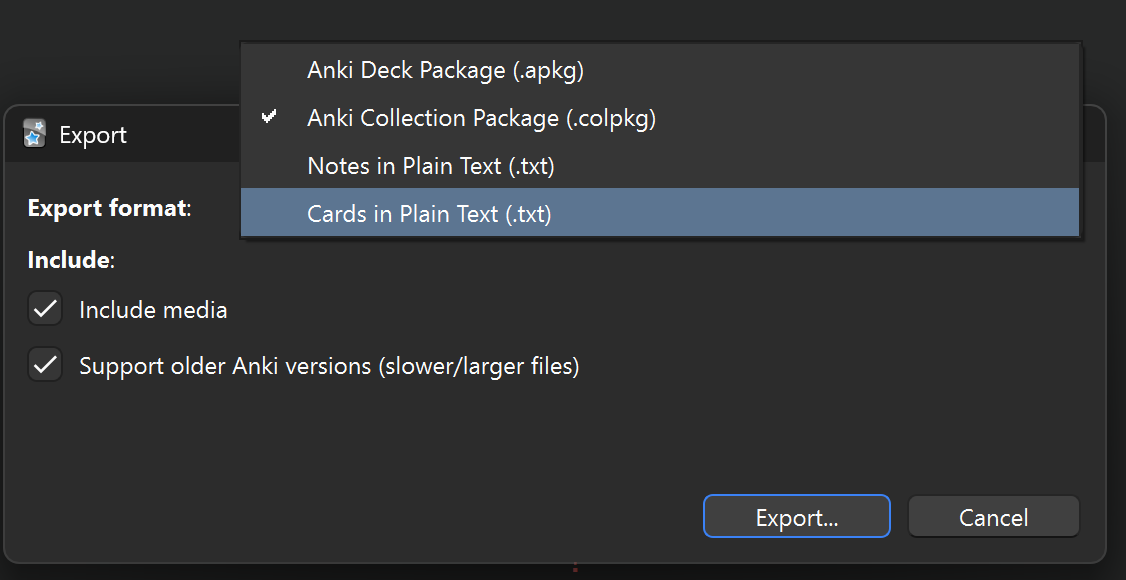
Anki Deck Package (.apkg). The “Include media” and “Support oler Anki versions” can probably be toggled off to save some space. If the deck has a lot of cards, consider moving a single card into a separate temporary deck and exporting it instead.