I have a small but frustrating issue with how Anki displays study time.
At the beginning of a session, it shows time in minutes — for example, 10 minutes, 20 minutes, etc. But once enough time passes, it switches to decimal hours like 1.75 hours. This inconsistency makes it hard to track and compare how much time I’ve studied in a simple and consistent way.
For example:
At one point, I might see “50 minutes.”
Later, it shows “1.75 hours.”
Now if I want to compare sessions or estimate what percent of an hour I studied, I have to mentally convert between minutes and decimal hours. Like: 10 minutes is ~17% of 1 hour… but what percent is 10 minutes of 1.75 hours?
This becomes even more annoying if I’m trying to build a daily rhythm (like studying 10 minutes every hour) and want to spot those patterns clearly.
My suggestion:
Give users a setting to choose the time display format. For example:
Always show minutes + hours (like “1 hour 15 minutes”)
Always show decimal hours from the start (skip minutes entirely, so not “6 minutes” but “0.1 hour”)
Or just let users toggle between both
Even just keeping a consistent format throughout the session would already help a lot.
I think consistent time formatting is important. It wouldn’t require major changes, and I don’t really see a downside — but I might be missing something.
I am okay if there would be no options. I just wish to have consistent studied time stat in order to be able to study hourly ~10 minutes for example. As it is inconvenient when I track my time in minutes, and it jumps into hours with decimals. I think it either should be like 0.80 hours from the start or 1h 20m when it gets beyond minutes.
But in my suggestion, I ask for consistent studied time in order to be able to track studying hourly and daily with fixed parameters. As when one day I did 50 minutes and next 1.37 hour it is hard to track them together as first in minutes, second is hour with decimals.
It would be easier if it would be an hour with minutes in the second example or minutes themselves would be shown as part of an hour in decimals like 0.5 hour for 30 minutes.
I think minutes is much better suited here than hours. The most this can go up to is 600 minutes if you studied 10 hours, perhaps even more but it’ll always be less than a thousand. And that’s pretty good for comparison purposes.
The issue with showing multiple units would be that it would take a lot of space and I think info overload.
Edit: I didn’t read properly. Yes, the first solution is much better. @A_Blokee Can you do it Luc? Fine if you don’t want to.
Changing it in this way seems like an i18n nightmare due to the way that it’s already set up. I could do it with a new translation string but it would still have to deal with cases like seconds.
Now if I want to compare sessions or estimate what percent of an hour I studied, I have to mentally convert between minutes and decimal hours. Like: 10 minutes is ~17% of 1 hour… but what percent is 10 minutes of 1.75 hours?
Thank you for your reply!
And thank you for mentioning that add-on. It’s quite useful.
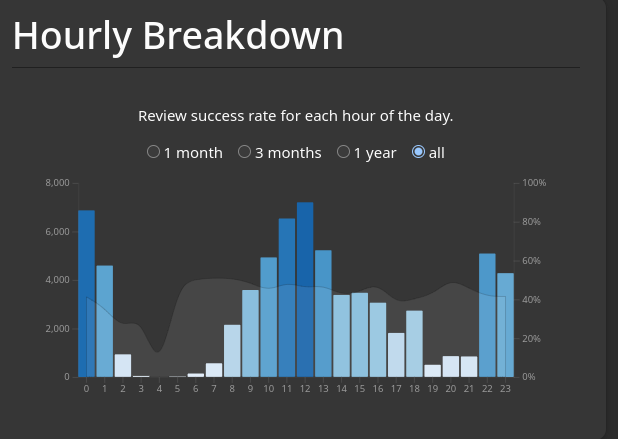
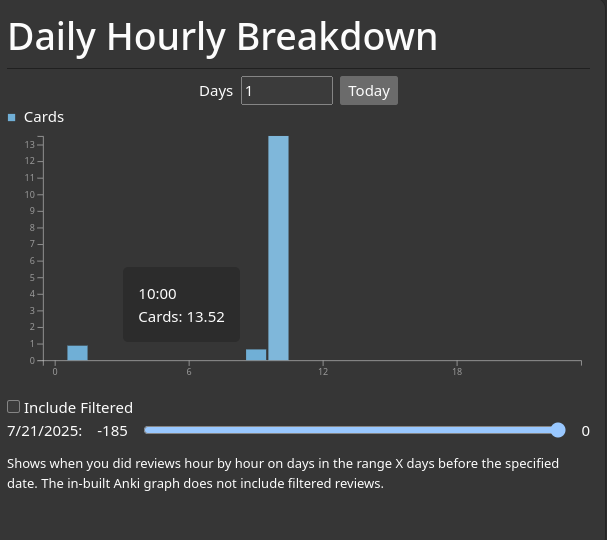
I don’t fully understand the graph, to be honest.
If I understood it correctly, the graph shows the number of cards studied per hour. It would be a great addition if it were possible to view this in Anki.
However, my cards vary in size it’s not just vocabulary decks with simple word-translation cards. For me, tracking time spent is more important than just the number of reviews. I no longer track reviews, but I do keep an eye on study time per day.
I’ve found that tracking my performance not only per day but also per hour helps me maintain a flow while studying, which increases the total time I spend studying each day. This naturally fits with a study-rest interval of every hour.
But if implementing this is too difficult, don’t waste your time on it. I can manage with Anki without this feature.
Thank you for taking the time to address this issue!
It looks great.
I’d be glad to use it as it is already.
Is it possible to display time in hours? For example, instead of showing 6 minutes, could it display 0.1?
If not, that’s fine, I’ll still use it as is.
I’d like to follow up with a simplified version of my original suggestion, based on the technical limitations that were mentioned earlier.
Since consistent formatting like “1h 30m” is currently too complex to implement, I’m proposing a simpler alternative:
What if study time were displayed in minutes only — for example: 30m, 55m, 95m, 120m, etc.?
This avoids mixed formats like “1.5 hours” vs “30 minutes”.
It keeps all time values visually consistent and easier to compare at a glance.
It sidesteps the complexity of hour-minute formatting logic entirely.
Most importantly, it would work consistently across Anki Desktop and AnkiDroid, unlike addon-based solutions which are limited to specific platforms.
This kind of display would be especially useful for users tracking their study habits daily or hour-by-hour. In my case, I find study time to be a more reliable metric than card count, since not all cards are equal, but time is.
If implemented natively in Anki, this could eventually lead to a unified display across all platforms - which would be a big improvement.
I’m not a developer, so I don’t know whether this is easier to implement or not. I’m just sharing the idea in case it’s feasible. Feedback from contributors would be appreciated.
Thanks for taking the time to read and consider this.
Thanks a lot for making that change. It might look minor, but it made a real difference for me. I use Anki daily, and this fix improves how I work with it.