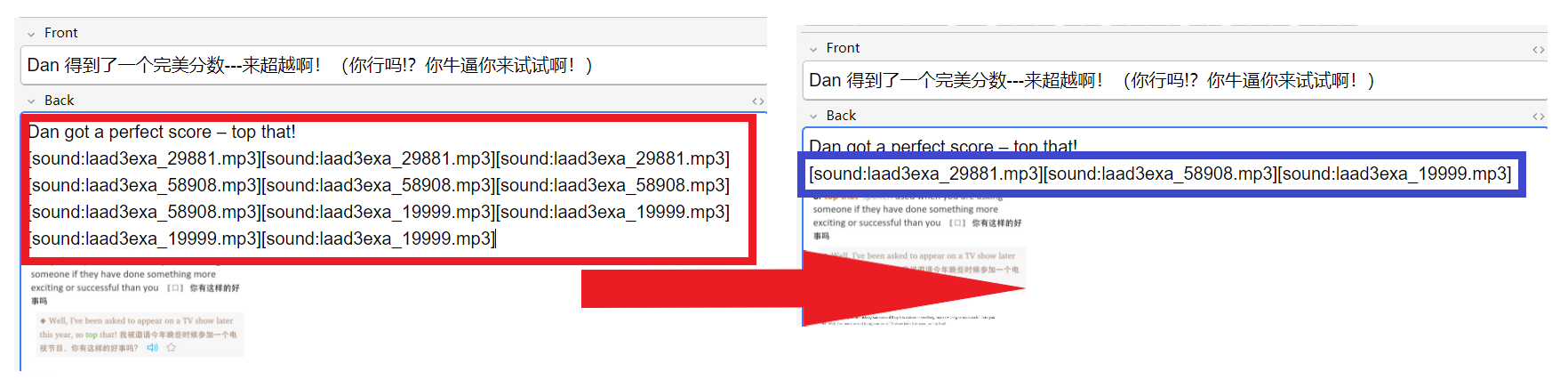
You can just triple the audio field replacements in your templates. Also, you can leave “Seconds to show answer for” at 0 if you don’t want it to do anything on the back.
Thank you for your previous response and for suggesting a workaround using field replacements in the card templates. I truly appreciate your time and attention.
However, I’d like to explain why this approach may not be practical for my use case—and possibly for other language learners as well:
Scalability Issues: I already have over 20,000 cards. Adding a dedicated Audio field and manually moving or duplicating audio files into this field for each card would be extremely time-consuming and inefficient.
Complexity and Clutter: If I want to replay audio multiple times (e.g., 3–5 times per card), I would need to insert multiple {{Audio}} fields repeatedly in the template. This not complicates the template design but also makes it harder to maintain or adjust repetition counts in the future.
Dynamic Workflow Needs: Ideally, I’d like Anki to automatically replay each audio file a set number of times before advancing—whether in the same card or across cards—without manual template adjustments per deck or note type. A native option in Auto Advance would offer a smoother, more integrated experience.
While the template-based solution works in theory, it becomes impractical at scale. A built-in feature such as:
“Play each audio file X times before advancing”
—would greatly simplify the process and enhance the learning experience for heavy audio users.
I completely understand if this may not be an immediate priority, but I hope you’ll consider this feature for a future update. Thank you again for your wonderful work on Anki and for supporting the language learning community!
If you’re going to let a chatbot respond to someone’s helpful and practical suggestion – you should make sure the chatbot understands the app and what’s being suggested.
If you don’t already have that field, with a file in it – then you aren’t playing MP3s from that note anyway. You’d need to do this before you could use the feature you’re requesting anyway.
It wouldn’t be “per deck,” because templates aren’t in decks. If you’re using so many different note types that this would be difficult to do “per note type,” you’re using too many note types. And the solution you propose would need to be adjusted per Options preset. It’s not any easier to adjust this in Options than it would be in the template.
The card template solution also allows you to control this field-by-field, which is how cards are designed. A blanket “Auto Advance” setting wouldn’t allow you to select which fields to play the audio from – and it wouldn’t help you when if you disable Auto Advance.
As you suggested, I would have to create a new “Audio” field and then manually drag every single MP3 file into this new field, note-by-note, for my collection of over 20,000 cards.
Having +6 audios on a single note and repeating each one 3 times is a bad idea anyway!
But… you can still automate the process by either using the advanced copy fields addon and regex, or exporting your collection and using python (or your language of choice) to separate the audio files into fields, then import back.
Okay. Your first mistake was putting media in the same field as text (and next was probably putting so much text in a single field). I think there’s a lot you could do to improve the structure of your notes.
However –
There’s no reason you’d need to move every [sound:] tag into a separate field. They can be together in one field.
There are probably easier ways to fix that than drag-dropping them file by file.
The feature you propose wouldn’t work with a note like that either.
If you’re ok with not replaying each audio file three times before replaying the next, then here’s another simple solution (that actually works this time!):
Select all the notes you want to have repeated audio.
Right click and select find and replace.
Put (\[sound:.*?\]) into “Find”.
Put <span>${1}<span hidden>${1}${1}</span></span> into “Replace With:”.
Select “In: All Fields”.
Check all 3 boxes and click OK.
This will duplicate the sound references in your fields directly. If you want to change it after that to say, replay only 2 times, use this <span>(\[sound:.*?\]).*?<\/span><\/span> in “Find:” and <span>${1}<span hidden>${1}</span></span> in “Replace With:”.
I wanted to extend my sincere gratitude for your detailed and thoughtful suggestions. Your guidance has been incredibly helpful in resolving my issue with audio repetition in Anki.
ZornHadNoChoice, your step-by-step find/replace solution worked perfectly! It solved the exact problem I was facing, and the follow-up tip for adjusting repetition count is also greatly appreciated. By the way, I noticed the Chinese character in your avatar – “鬱” (yù). It’s a rather complex character meaning “melancholy” or “gloom,” but it can also signify lushness (as in lush vegetation) in classical contexts. It’s famously known as one of the most complicated characters in written Chinese! If you enjoy characters with such intricate structures, I think you might also appreciate “懋” (mào), which is also visually complex and carries positive meanings like “lush,” “splendid,” or “to encourage.”
Danika_Dakika, thank you for the structural advice about note organization. You’re absolutely right about keeping media and text separate for better note management. I’ll definitely be reorganizing my note templates based on your recommendation.
Both of your inputs have not only solved my immediate problem but also helped me understand better note design principles. The Anki community is truly fortunate to have contributors like you who take time to share such detailed, practical knowledge.
Glad it worked for you. Also, the kanji 鬱 has the most number of strokes (29) in the Jouyou kanji list. Reaching it in my kanji deck will be quite the feat (it’s number 2141) and that’s why I have it as my profile picture. Your suggested Hanzi doesn’t seem to be common in Japanese according to kanji study (and its 17 strokes are meager in comparison!).
I need to find multiple identical audio files that are connected together in Anki cards, and then merge them (or delete the duplicates) into a single audio file. I want to achieve this through find and replace. Could you teach me how to do this? The files are mostly mp3 and some 3gp, but mainly MP3.
Edit: the regex (\[sound:.*?\])(?=[\s\S]*\1) should find all audio references which have an exact copy somewhere after (probably only in a single field and in a single note). You can replace it with nothing to remove it, but make a backup first.