v5.2 - Note Type Constructor
This update brings a card Constructor to the support add-on, allowing for a friendly way of customizing the template: changing fields and their labels, adjusting directions of testing and the types of the tests, keyboard layouts, color themes, etc.:
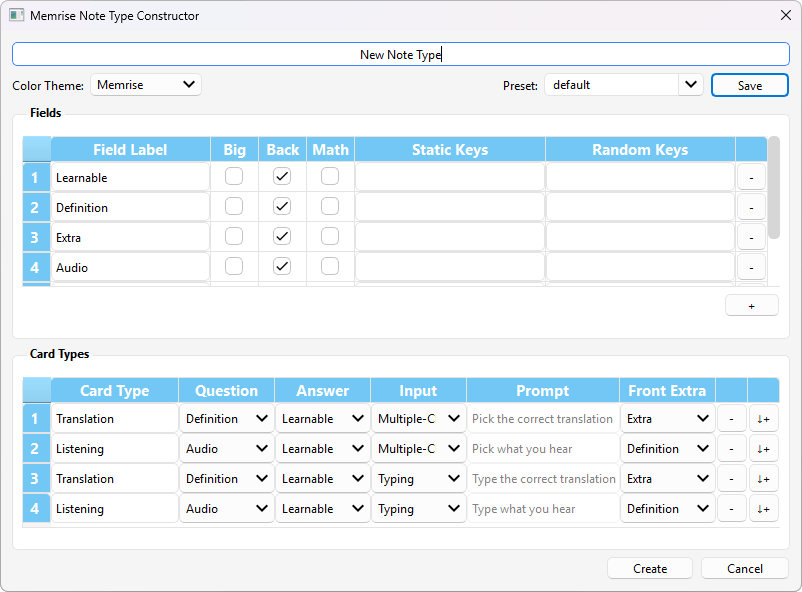
No more manual Field renaming and reordering is required, and there is an explicit bigger-font setting. Any unconventional test types, such as spelling exercises, should also be very easy to set up from now on.
The options are based on the Memrise community course properties and gather all the settings from multiple pages of the original site in a single place.


Creating Memrise Note Types
To make a new Memrise Note Type, go to Tools → New Memrise (Lτ) Note Type in the main Anki menu:

This will open a dialog with all the Memrise settings. Each option, when hovered, provides a hint, which indicates what original Memrise course setting it relates to:

(also see Memrise ↔ Anki glossary)
Keep in mind that selecting the “Multiple-Choice” option does not immediately generate Multiple-Choice Cards. It is still required to use the “Fill Choices” function after some Notes are created from a newly constructed Note Type.
Presets
There are several presets packaged with the add-on that can be used to get a general idea of different possible setups or to serve as a starting point for customization:

Customized setups can also be saved as new presets by typing a unique name into the Preset field and pressing Save. It is recommended to save every preset that has the potential of being reused or needing adjustments in the future. The creator dialog does not modify existing Note Types, because they might include customizations that go far beyond basic Memrise settings and cannot be fitted back into a predefined set of GUI options. If a preset is saved, adjustments to the Cards generated from it can be made by creating a new Note Type from a loaded and modified preset and then converting all cards with the Notes → Change Note Type command in the Anki Browser menu.
Minor changes to existing Note Types or changes not covered by the standard Memrise settings can still be made using the old way via the Anki Card Template Editor (example).
Having a saved preset will also simplify updating to newer versions of the template when they are released.
Functionally, all the cards generated using v5.2 template should remain the same as v5.1. Cloze Note Types are not currently available for generation using the UI and can only be manually customized from the respective template in the template Anki Deck.