I just tried installing 25.07 but the first run failed because it did not find the launcher where it looked. It looks like it needs a / in front of Applications at the start of the path.
If I run the launcher with the full path from the command line it works fine so that was my workaround. After that when I run Anki it starts up fine.
I’m running this on a Mac with Apple Silicon and Sequoia 15.5. Python is version 3.13 from Macports.
Last login: Wed Jun 25 14:35:03 on ttys002
/Applications/Anki.app/Contents/MacOS/launcher ; exit;
[oh-my-zsh] Would you like to update? [Y/n]
[oh-my-zsh] You can update manually by running omz update
(venv_m1_313) ➜ ~ Applications/Anki.app/Contents/MacOS/launcher ; exit;
zsh: no such file or directory: Applications/Anki.app/Contents/MacOS/launcher
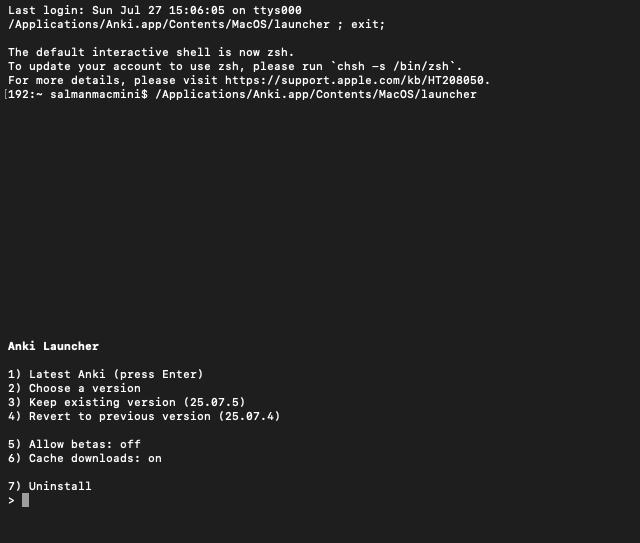
Similar issue where i need to copy the command and paste it to begin the launcher
The upgrade/downgrade tool opens the terminal but does not automatically begin launcher
I’m afraid I’m not sure what’s going on here, and can’t reproduce it with a fresh macOS install. What happens when you open a terminal manually? What happens if you manually run this from a terminal?
open -a Terminal /Applications/Anki.app/Contents/MacOS/launcher
It looks like you still have your default shell set to /bin/bash. Apple really wants you to change it to zsh, so they have this message built into their version of Bash. You should see the same message if you start Terminal on your own without Anki, although at that point it will be just an annoyance.
I would just change your shell to /bin/zsh. The Bash in Sequoia is 3.2.57, where the latest Bash available is 5.3. Apple is not keeping Bash current.
If you really prefer to use Bash, though, you can silence that message. Per Apple’s instructions, add the following to ~/.bash_profile or ~/.profile:
export BASH_SILENCE_DEPRECATION_WARNING=1
Then see if you still have problems running Anki or the launcher. I can get the error about zsh to come up in Terminal if I change my shell to /bin/bash, but it doesn’t come up when I run Anki and the launcher works fine for me with bash as the shell.
@beirne to confirm, if you change your shell to bash, do you a) see the message but things work properly, or b) experience the same ‘have to paste to run’ behaviour that the OP is seeing?
@dae, if I change my shell to bash the launcher comes up normally from the Anki Upgrade/Downgrade menu selection without any warnings about zsh not being the default shell. Everything works fine. If I do a ps I see the parent process of the launcher is -bash but for some reason Bash does not generate the warning for me in the launcher Terminal when run from Anki.
If I run “open -a Terminal” from the command line inside iTerm I get a new Terminal window with the zsh warning, so somehow the warning is being squelched when Anki starts the launcher, a good thing.
A little more detail. I did this testing in an account I created just this morning for this purpose, using the Anki already installed in /Applications. It did download the Python modules and whatever else gets brought down the first time I ran it from that other account. No problems on that part either, though.
I haven’t tested changing my shell to Bash on my normal account. Anki is working fine on my normal account with my issues all resolved, so I didn’t want to monkey with it there.
Changing to zsh solved the issue and launcher begins successfully without needing to copy paste.
I am not so much a techie person, I had changed it one time before to zsh but my cli werent working. Using chatgpt, i moved those from bash to zsh profile so everything is working now. I am new to macos so did not know about zsh.
Thank you @beirne.
Btw I am using defualt zsh on macos, not oh-my-zsh.
 .
.