Issue with Installing Anki launcher into custom folder

Hi Anki community!

I am trying to install and run Anki in windows environment using new Anki launcher from a different drive and folder due to space constraints. To do this I tried to follow “Update launcher USB docs #444” knowledge article referenced in Anki changelog.

I was hoping to place everything anki related into K:\MyAnki folder

I downloaded anki-launcher-25.09-windows.exe and run it as administrator specifying destination folder as K:\MyAnki\Launcher, which automatically added Anki to the end

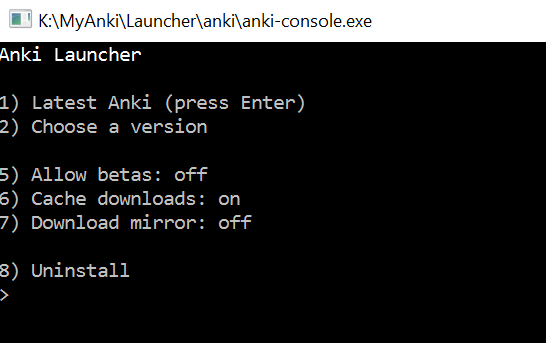
After clicking Install anki console appeared

As per knowledge article I just closed this console without selecting anything.

Next I created anki.bat file as per lines 187-193.

Below is my anki.bat file (I have commented first line for debugging purposes)

After double clicking the bat file it just opens up explorer

It looks to me that on line 193 I need to add anki at the end making bat file as below
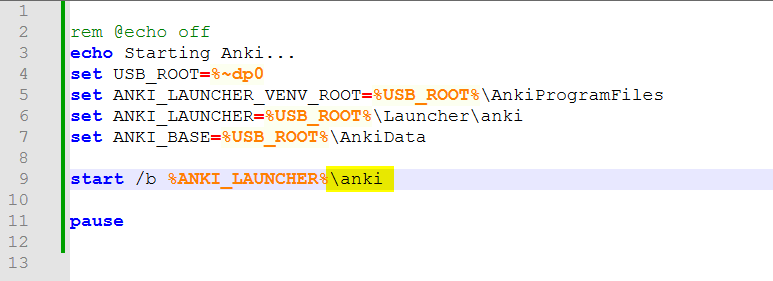
After double clicking on bat file

AnkiProgramFiles folder appeared in K:\MyAnki, which is probably a good sign

In the above console I pressed Enter

Following update below window briefly appeared and then just closed itself

After above window self closed nothing happened.

As I understood I need to double click on K:\MyAnki\anki.bat again, which resulted in the following

What I noticed in the above is that there are 2 slashes after K:\MyAnki**\\AnkiPrograms and also there appear to be forward slash rather than backslash after Scripts, which I understand is used by Mac rather than Windows (“Scripts/**pythow.exe”).

Is there anywhere I need to tell in config files that it’s windows rather than Mac?

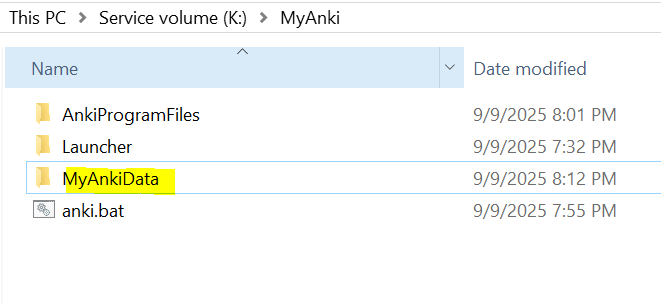
I wonder if I would need to use a different bat file to make anki store data files on K drive to. I have created subFolder MyAnkiData as below
I then adapted line 179 to try and launch anki using MyAnkiData folder as location for my cards and media

My launchAnki.bat file looks as below

After double clicking on launchAnki.bat file nothing happens (I even added extra pause at the start in case I missed a message).

I checked Task manager and don’t see anki running.

Any pointers where I am going wrong?

2 Likes

I suspect that’s what led you astray. If you use the exact path the docs specified, it should work without any modifications.

Hi Dae,

Many thanks for replying and your help.

I have installed on a flash drive with letter E and was able to launch it.

As suggested created bat file as per documentation

Clicking on anki.bat would launch Anki from USB, which is great

What I was hoping to do then is to copy E:\Anki from usb flash drive onto another PC onto E drive and be able to run it from that PC (previously I was running anki 25.02.5 Python 3.9.18 Qt 6.6.2 PyQt 6.6.1 on that machine, so my thinking was that I should have high chances of successfully running 25.09 on that machine too)

Below is the copy of USB flash drive saved on E drive of target machine

On double clicking anki.bat on the machine with the copied files from USB drive I got below output (had to add pause at the end to see error message)

I don’t know much about python, but tried running below hoping to glean more information

The outputs I got

I did a bit of googling on “ImportError: DLL load failed while importing QtCore” and some suggested that setting PYTHONPATH variable might help, but not sure what I should be setting it to and whether it’s the avenue worth pursuing.

Below is the previous version of Anki I was successfully running on the machine that I am struggling to get 25.09 running

I have also tried running script showing python info on targeted machine and got below output, not sure if it’s of any help

E:\Anki>E:\Anki\AnkiProgramFiles\.venv\Scripts\python.exe python_env_info.py
=== Python Environment Information ===
Python Executable: E:\Anki\AnkiProgramFiles\.venv\Scripts\python.exe
Python Version: 3.13.5
Python Module Search Paths (sys.path):  
- E:\Anki  
- E:\Anki\AnkiProgramFiles\python\cpython-3.13.5-windows-x86_64-none\python313.zip  
- E:\Anki\AnkiProgramFiles\python\cpython-3.13.5-windows-x86_64-none\DLLs  
- E:\Anki\AnkiProgramFiles\python\cpython-3.13.5-windows-x86_64-none\Lib  
- E:\Anki\AnkiProgramFiles\python\cpython-3.13.5-windows-x86_64-none  
- E:\Anki\AnkiProgramFiles\.venv  
- E:\Anki\AnkiProgramFiles\.venv\Lib\site-packages  
- E:\Anki\AnkiProgramFiles\.venv\Lib\site-packages\win32  
- E:\Anki\AnkiProgramFiles\.venv\Lib\site-packages\win32\lib  
- E:\Anki\AnkiProgramFiles\.venv\Lib\site-packages\Pythonwin
Installed Packages:  
- anki==25.9.2  
- anki-audio==0.1.0  
- anki-release==25.9.2  
- aqt==25.9.2  
- attrs==25.3.0  
- beautifulsoup4==4.13.4  
- blinker==1.9.0  
- certifi==2025.6.15  
- charset-normalizer==3.4.2  
- click==8.2.1  
- colorama==0.4.6  
- decorator==5.2.1  
- Flask==3.1.1  
- flask-cors==6.0.1  
- idna==3.10  
- itsdangerous==2.2.0  
- Jinja2==3.1.6  
- jsonschema==4.24.0  
- jsonschema-specifications==2025.4.1  
- Markdown==3.8.2  
- MarkupSafe==3.0.2  
- orjson==3.10.18  
- pip==25.1.1  
- pip_system_certs==5.2  
- protobuf==6.31.1  
- PyQt6==6.9.1  
- PyQt6-Qt6==6.9.1  
- PyQt6-WebEngine==6.8.0  
- PyQt6-WebEngine-Qt6==6.8.2  
- PyQt6_sip==13.10.2  
- PySocks==1.7.1  
- pywin32==310  
- referencing==0.36.2  
- requests==2.32.4  
- rpds-py==0.25.1  
- Send2Trash==1.8.3  
- soupsieve==2.7  
- typing_extensions==4.14.0  
- urllib3==2.5.0  
- waitress==3.0.2  
- Werkzeug==3.1.3

Any suggestions as to what else to try?

Many thanks for reading and your help

That error might indicate an outdated Windows installation. What’s your Windows 10 version/build shown under This PC > Properties?

2 Likes

Thank you for your help abdo. You are spot on! This is on Windows Server 2016. It doesn’t appear to be new launcher issue or custom folder location as I was able to install launcher into custom location and then download version 25.02 and successfully launch it using launcher. Upgrading to the next version of anki 25.07 resulted in Anki not launching. As I understand anki 25.07 uses different version of python, which is probably no longer supported in that environment.

Next I tried installing it onto Windows server 2022 and was successful with using launcher with version 25.09.2 and having it in a custom folder!

Many thanks for your help everyone!

3 Likes

Good catch @abdo! I’ve added a check for the Windows version to the launcher to make this clearer in the future.

1 Like

This topic was automatically closed 30 days after the last reply. New replies are no longer allowed.