Hi. I have Anki installed on my Ubuntu Linux. It worked fine until today. I had installed it through the App Center some time ago. I suddenly have a problem of blank screen, blank main panel where I don’t even see the decks. If I run it from a shell command line in order to see the messages as:
$ snap run anki-desktop
here is what I see (please see the screen shot):
I ran into the same issue. I’m also on Ubuntu. Anki was working just fine for me 24 hours ago, but I ran into this issue when I opened it up 15 minutes ago. Restarting both Anki and my computer didn’t fix anything. I didn’t upgrade anything on my computer (Anki or otherwise) between yesterday when Anki was working fine and tonight and 15 minutes ago, when I ran into the issue. It’s interesting that we both encountered the same issue within an hour of each other.
Here’s my version (I can’t actually see it in Anki; but I do see the “Copy debug info” button, which I clicked and copied into a text editor):
The cursor changes when I move it over the blank area where I expect the list of decks to be; so I suspect the contents of Anki are there, but just not visible.
I tried running sudo apt-get update then sudo apt-get upgrade and then also running the Software Updater to update my computer. I am about to restart my computer to see if the updates fixed anything (I want to post this before restarting because I’ve already typed up most of it).
Update:
Restarting my laptop a second time (this time after the updates) didn’t fix anything.
I’m not using and have never used any add-ons with Anki on this computer. The menus seem to be working fine, even if nothing is displayed in the main window:
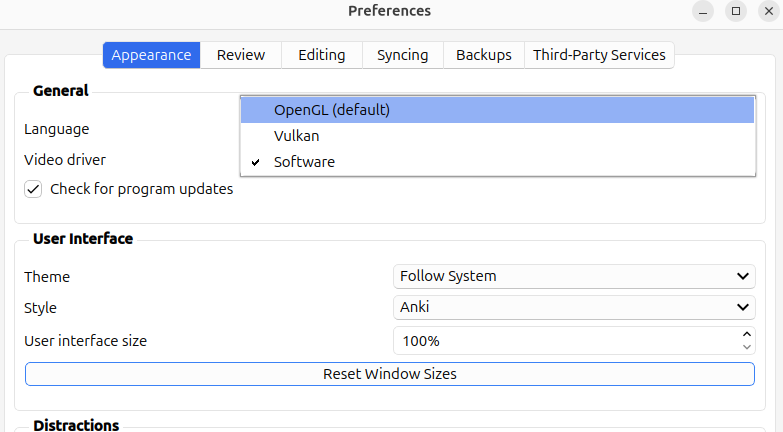
I’ve discovered a workaround. I clicked “Tools” at the top of the page, then “Preferences”. I changed “Video Driver” from “OpenGL (default)” to “Software”, then restarted Anki: