Memrise card template [support thread]

This indeed wouldn’t be possible to do from GUI, because that one provides access only to the basic setup parameters available on the original Memrise site. More advanced modifications are supposed to be done directly in code after creating the base for the template, so you were on the right track.
If you want to add audio on the front of the Card, which already has another Field as the question, you can copy the code for the audio block from the back of the Card to the front. If your audio Field is called “audio” (capitalization matters!), the block should be structured like this:

		{{#audio}}
			<div class="mem-field no-alts">
				<label>audio</label>
				<h4>{{audio}}</h4>
			</div>
		{{/audio}}

So you can copy it from here as well and adjust the “audio” field Name (in four places!) to match yours if necessary.

As for the pasting, you can put it right before <div class="mem-typing"> line on the front side, for example. This will insert the small audio button on the left side below the question image and above the typing element/multiple-choice buttons.
Alternatively, you can insert it anywhere else, depending on your preferences. The code in the block and the associated styles can also be adjusted to appear in any desired way.

Do I understand correctly that the question Field in all three Card Types is the “question diagram” (along with the audio, if the above is implemented)?

I’m not sure what problem this refers to. By default, the backside of all Card Types should display all the Fields, including the “answer image”. The Front side only displays the question Field and, for multiple-choice, the answer Fields (as buttons). So, if I understand your setup correctly, the “answer image” Field should be showing on the front only on the second Card Type, where a correct “answer image” is supposed to be selected from several options.

You can change the order of the Card Types after a Note Type has been created. In the same Anki window where you modify a Card Type code, there is an “Options” dropdown menu (actually, there are two – I am referring to the first one, which is selected right after the Card Type dropdown menu), where you can find the “Reposition Card Type” feature.

But! The order in which the Cards will be introduced in learning is not directly related to the order of the respective Card Types. If you want to achieve a specific ordering, you will probably have to adjust it in Anki Browser after all the Cards have been generated, either way.
I would assume that typing Cards are already scheduled for you first, because they are generated as soon as Notes are added, while the multiple-choice Cards only appear after “Fill Choices” is applied. However, the default order will most likely put all 144 typing Cards first, then all 144 multiple-choice Cards of the first Type, and then 144 multiple-choice Cards of the second Type. You can check this in Anki Browser: with the Cards/Notes toggle being switched to “Cards”, the “Due” column should indicate the ordinal number for each Card (in the format “New #number”). To change the order of Cards, you can use the “Reposition” function: select the Cards → right clickReposition or Ctrl+Shift+S (more info in this manual page: Browsing - Anki Manual, if it helps)
1 Like

thanks for this. Very clear and I think its totally doable. I assume if I don’t want the audio in the back I can just remove that bit of code or uncheck the “back” checkbox from the gui?

Correct

correct, again. Do I need to make any modification for this to work in that way? since I had the 4 fields: question diagram, audio, answer text, answer image I think i would always want question diagram and audio to be in front, and then answer text and answer image would be on the back with the exception of answer image being an available choice on the second card type which is multiple choice using images.

Yeah the more random this is presented at first, the better.
My question regarding creating is… would it be easier or more organized to do all 144 cards of say, the multiple choice with images type first, then could I just duplicate (copy paste in card browser) all of these and change the card type in bulk and I would be done?

Correct.

Only uncheck the “back” checkbox for the “audio” Field and paste its code on the front side (of each of the three Card Types) after the Note Type is created. Nothing else.

On the Card, where “answer image” is the answer, it will still be shown on the back, but in a different section. The backside always shows the question Field, the correct answer from the answer Field alongside the answer selected/typed by a user + all the remaining Fields that had the “back” property checked for extra information.
You can remove the “answer image” from the Card where it serves as the answer Field by modifying the back-side code as well, of course, but I’m not sure why you would want to do this, since it is supposed to help a user review their answer and understand errors.
As for the “question diagram”, because it is set as the question in all of your Cards, it will always be shown on the back as is.

If you would like a completely random order instead, I think it would be easier to achieve via Deck options. Just set “New card gather order” to “Random cards” and “New card sort order” to “Random” in the “Display Order” category. This way you won’t need to modify anything in the Cards themselves.

Not sure I understand the question. You don’t create Cards manually – you only create Notes (144 of them), and then Anki will automatically generate 3 Cards for each Note according to your “Card Types” setup.

Got this. After some more tweaking and whatnot… I am finally able to use this . Sadly the way anki interface works its not too accessible or easy to test, anki web is best for screen readers and android as well, but I am succeeding! thank you for an impressively useful template that totally transforms, boost and gives life to Anki. As for the paragraphs to using yourmemrise note type creation tool (windows and NVDA):

1 Like

The Cards made with this method should work when reviewing on AnkiWeb as well, without any limitation in functionality.

Thank you. I’ll make sure to include them when I get to documenting the Card creation update. If you leave me your e-mail (or a GitHub account, if you have one), I’ll be able to add you as a co-author for the commit. Or I can simply put a link to your current forum account in text, if that’s preferable.


Also, all of this got me thinking about text accessibility. Does basic text formatting, such as marking parts as bold or italic, matter? Does organizing appropriate sections into ordered lists and using text hyperlinks to other paragraphs make the text less or more accessible? Is there a perceived difference between putting certain elements in code delimiters, like this one, and surrounding them with quotation marks or square brackets? Maybe you could answer some of those questions.

1 Like

Was fiddling and got a pair of eyes to confirm things, They appear to work fine indeed, but when showing the images as multiple choice answers I think they do not load or apparently they are too small on the screen in the windows app and android, but on anki web they work fine. Any suggestions for this that you might have?

Cannot post links yet, but my username on git is the same as in here. ultraleetj · GitHub

For someone who has zero vision like me, not much, unless I explicitly decide to have my screen reader announce all of the text attributes…and I forget that its a possibility 99% of the time. If anyone reads braille and has these turned on it could be helpful for them, but i think its the same general idea, because I think we are more focused on skimming and grasping information quickly than thoroughly.

Quotation blocks like the ones we have been using for this conversation, yes. They are announced and can be skipped or jumped to. Putting things into quotation marks or brackets or other symbols to delimit things… largely will depend on the punctuation configuration a person uses. I only put full punctuation and indentation when I am reading through code for instance. But for every day uses I have punctuation to almost none.
Re: ordering in lists, links to content yes, though headings are also a tremendous help when navigating things. And I believe that in most cases, a great deal of making something accessible also lies in how easy it is to navigate or get to things, without it being also overwhelming with possibilities.

1 Like

I’m not sure. If everything worked as intended, the only factor affecting the size should be the width of the Anki or Browser window. When it becomes narrow, the buttons are scaled down along with the images they contain. This can be adjusted by adding a style to arrange the buttons in narrow windows in one column instead of the default two. Other than that, the Cards should look identical.

If it were the other way – not loading on AnkiWeb, but viewing fine on Android and Windows, that could be explained by loading times, because the Anki apps have all the data stored locally, while AnkiWeb has to download it each time a Card is opened for review. But if your description is correct, and you’ve been viewing the cards in full-screen windows, this seems odd.

If you could share what you got as the result, I could test it on my end to see if I find anything out of order.

I am testing these on other cards and its mainly in Spanish, but the concept is the same: Select an image (card back) that would be the correct answer.
Also, I am sure I synced media on every device before taking these:
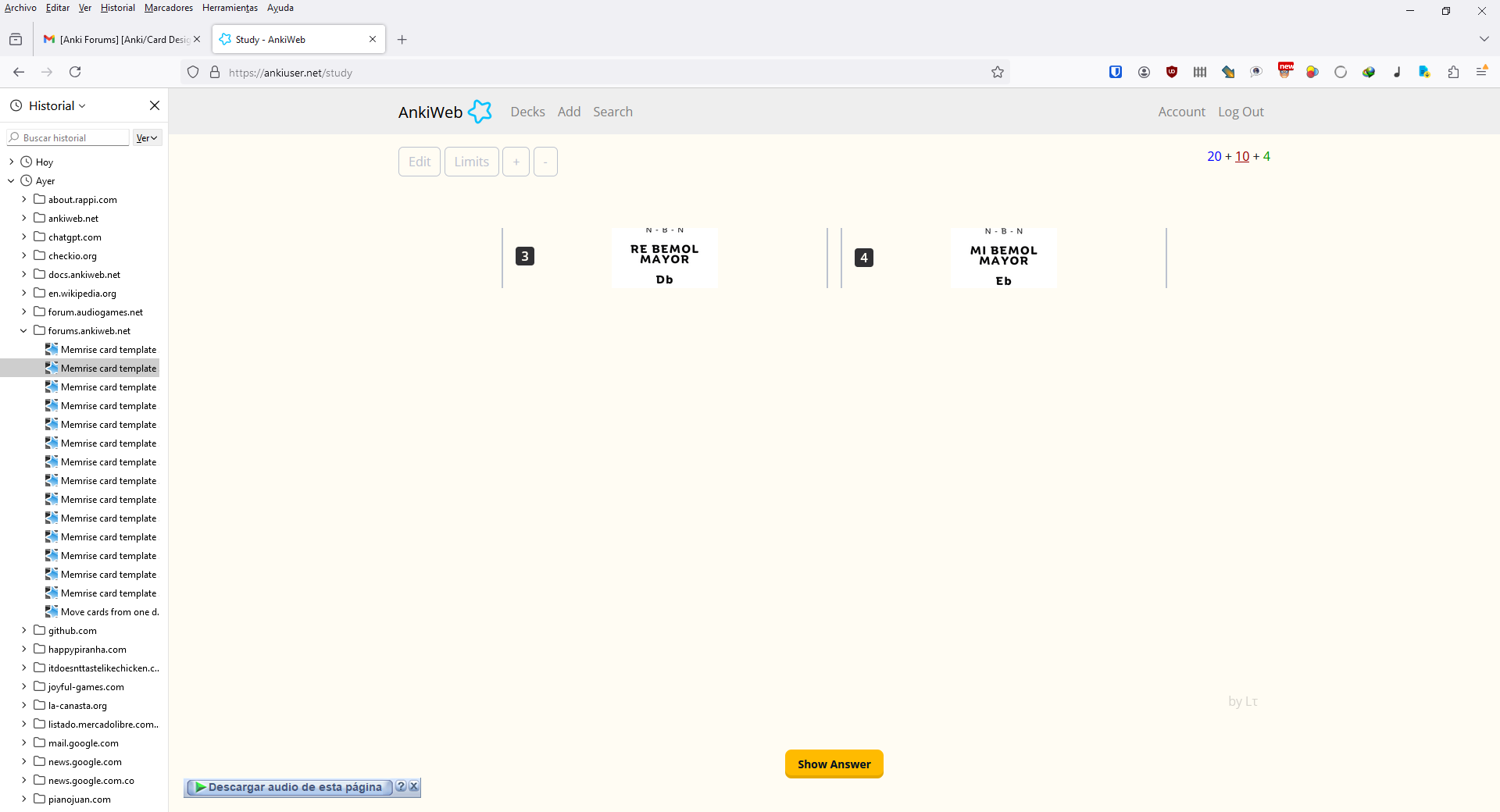
here is a screenshot on windows in anki web, firefox:

and here is the corresponding android screen:

Hm. This doesn’t look right at all, and the android screen appears completely empty. Can you share a Card, or the template code from it, so that I could test it?

Tried to attach the the .apkg file and was not allowed, so here is a link to it: https://drive.google.com/file/d/1QIqrZSnchzM8qRdoOo-Lp14chrZ7RguU/view?usp=sharing

1 Like

It appears there are two missing closing tags after the text prompt on each of the three Card Types. You’ll need to insert the following line after “escribe la cifra del acorde…” and the two others in your templates:

</div></div>

Maybe you deleted them by accident when you were inserting the audio button code? Although the button is not located directly next to the missing part, so I’m not sure how this could happen. But I also couldn’t reproduce it when creating the template from scratch, following the same settings with the GUI.


On a sidenote, I see that you changed the link address, but the text on it still says “by Lτ”. It won’t be as easy to change the text because it is intertwined with the template’s CSS quite a bit, but I can suggest a better way of adding your link so that it would indicate where it leads more clearly, if you wish.

Also, the template by default includes a hint button, which reveals the answer on a typing Card one letter at a time. Since answers on your Cards consist of only one or two letters, it might be a bit unnecessary. So if you’d like to disable it, you can add the respective class, or just delete the whole line starting with

<div id="HintButton"

This worked, thanks. I am working on the 144 cards finally.. However, now I am facing a problem… when writing an answer, the keyboard writes from right to left so if I type “hello” it turns into “olleh”. Is this fixed from the code or field settings inside note type? edit: turning the hint button off fixed it but I think here the hint button could be useful.
also when filling choices, I notice that a few sporadic cards, in image choices especially at the beginning of the list are not being generated.. some show 2 instead of 3 for the generated cards but its inconsistent, seems somewhat random. I had to resume working in another pc and I think I installed everything, but media file locations changed when I started adding new content because I did it from drive… could this be why? or is this more of an Anki deck option that will hold off generating new cards until some are studied first…

Not sure. Everything looks in order and is narrated correctly when I test in on the version of the Cards you’ve shared. Can your system settings be affecting this?

Do you apply “Fill choices” to all your Notes at once? If you miss some when selecting, that might be a reason. Also, how do you check the number of Cards per Note? Is the number 2 showing in Anki Browser, or are you counting them yourself during a review? Can you check if the respective “Choices…” Field on a Note with a missing Card Type is empty?

I don’t think so. When you add media files into Anki Notes, they get copied into Anki’s media folder, so the original location shouldn’t matter. There might be an issue with syncing – when you open your collection on another device, it takes some time for all the media files to get up to date. However, this should still not affect Card generation, only the displaying of the images themselves.

No, Anki generates all the Cards as soon as the required conditions are met, which, for typing Cards, is having answer and question Fields filled, and, for multiple-choice Cards, is answer + question + choices Fields being non-empty. Assuming that you first make your Notes filling all the non-choice Fields, and then using “Fill Choices” on all of them, the respective multiple-choice Cards should appear right after.

realized it was the hint button that caused that behavior… I turned it off and now they work as expected, but the hint button could be of more help in this new set.

I selected all notes in the list from the card browser and filled the choices for each. AnswerText choices worked fine, answer Img choices left some unchanged or did not generate new cards apparently… I use the card browser to know if a note has 1 or 2 or 3 cards.
When they are images, its impossible for me to check in the editor if that field has been filled… attaching images to fields is not read outloud. When attaching audio at least I get a file name, but not with images.

This shouldn’t be the case either. While the Hint button interacts with the typing field when pressed, I can’t imagine how it can affect the display of what is already typed by simply being there. If this is some other Note Type you are creating, can you share a Card so that I can test it as well?

I’m not exactly sure what you mean by filling choices for each Card, as they are generated for all of them at the same time, not individually. But other than that, everything sounds in order. Could you maybe screenshot your process? Otherwise, it’s hard to say what’s going wrong and at what point.

You can check the source code for the Field. It is opened by pressing Ctrl+Shift+X, and then can be narrated by selecting everything via Ctrl+A. You will have to expand the Choices Field itself first, though, as it is collapsed by default. But if you were able to check the text choices, I assume you have the means to do so.

Alternatively, you could narrate the Field contents with the punctuation on. The choices are separated by the pipe symbol, so even if the images themselves are skipped, you should at least be able to hear the delimiters.

OK, here are the two sets. One with choices filled, and another without choices filled. Template/card type is basically the same as before.

Regarding checking the field, I was actually able to do it with the html editor enabled, though had to route the mouse to it and then click, then a second edit field appeared with the code. Selecting all does not announce anything in qt, but using hierarchical object navigation did read everything I was hoping… file names and the | separator. I actually tested this on the second note from the top down, one that had just 2 cards generated to see if a missing field was the problem, but all fields were filled.

And the process for generating choices is as follows:
I open the card browser, focus the list and press control plus a, then go to the cards menu, fill choices. I then select “answer text” as the source and “choices answer text” as destination., append. Then press on OK. Then for the other card type I repeat exactly that but select “answer img” as source and “choices answer img” as destination. I guess “for each” multiple choice card type I needed, sorry I was not very specific.

It seems all the Notes with only 2 Cards instead of 3 are missing the image in the “answer img” Field (maybe you forgot to stick it like the “answer text” when resuming on the second pc?). Because there are no answer images, the template didn’t generate multiple-image-choice Cards, as there wouldn’t be anything to answer them with.

You should be able to identify the Notes with missing images by searching for

"note:ᵝMemrise (Lτ) intervals music" -answer_img:_*

in the Anki browser (there should be 40 such Notes in total).

Also, there is one Note where the “answer img” Field accidentally includes the same image twice. You can find it using the following query:

answer_img:*img*img*

The Choices Fields themselves appear to be filled correctly, but because fixing the issues above will alter the Choice sources, you will need to refill the image choices on all the Notes (using the “overwrite” option) afterwards.


I also checked the typing form again, but didn’t find anything odd about it. It seems to work fine both with and without the hint button, and does not try to reverse text, so I’m still not sure what that could be about.


It did so for me. Maybe it somehow depends on system/regional settings as well.
It might also be a difference in Qt versions, although since the template creation window worked for you just fine, I’m assuming you are using the same Qt6 version of Anki, and it’s probably not the reason.

1 Like

thanks for this.. also for taking the time to go over all of it. It all works as expected now. Here you have given tremendously valuable information on many useful things on Anki usage.

1 Like

Hello! First of all, I would like to express my sincere gratitude for this template. I experienced significant burnout, but I am returning to studying through Anki, and you have contributed to this. Thank you very much for that. I have the following question. The code specifies a sound function when the again/good buttons are pressed. Can I turn it off and instead have the sound play depending on whether the answer is correct or incorrect? Thank you in advance.

1 Like

I’m not sure what you are referring to. The template doesn’t play any sounds other than the audio files from the cards.