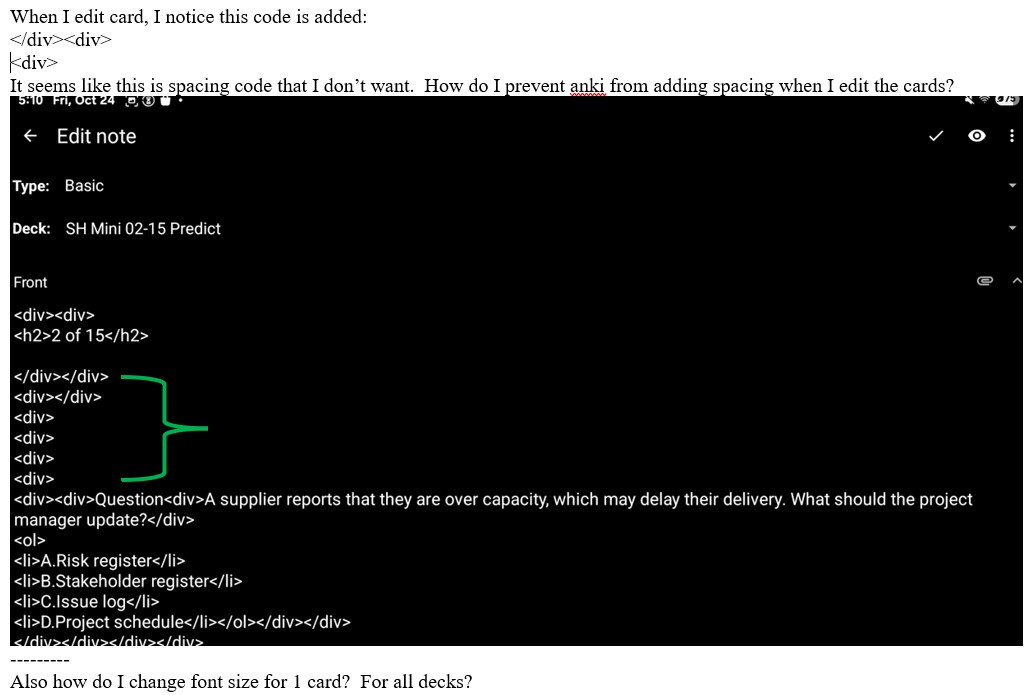


This is usually caused by a settings in AnkiDroid, but I’d expect to see <br> being added instead of <div>. What do you have set for – Settings > Advanced > disable “Replace newlines with HTML”?
after I disabled replace newlines with html, extra lines are not added when i edit text.
but now the issue is when i want a line or 2 to separate texts that i already inputted, it won’t. do i need to add ? is there way to edit, add new line by pressing return key?
This is an old issue
Editing a note turns insignificant newlines into explicit line breaks · Issue #3304 · ankidroid/Anki-Android · GitHub.
What’s weird is that it’s adding <div>s instead of <br>s.
You can add <br> wherever you want a new line.
thanks
that cumbersome to have to type
everytime
i surprised anki cannot act like a text file notepad
- no formatting, no color, no font type, no font size, just plain text
You’re overlooking the hidden characters in that text file that make it look the way it does – like newline characters.
Most of what you see in Anki is a webpage, so it needs webpage language to display things.
If you find you’re needing it a lot, you can use the  on the toolbar to create a toolbar item for it. You can put
 <br> as the “before”, and leave the “after” empty. It will work just like having that in your copy buffer to paste any time you want.
if i copy/pasted an image from a screenshot into, is the image searchable? i don’t think so, i tried it
I see the magnified glass icon to search text - it only searches the deck names. can it search text in the deck like the individually cards? i don’t so or at least i’m not able to.
Searching in the card browser will search all text in the notes in your collection – including text in fields, tags, deck names, and more. But it can’t search images, because they aren’t text (except for their filenames).