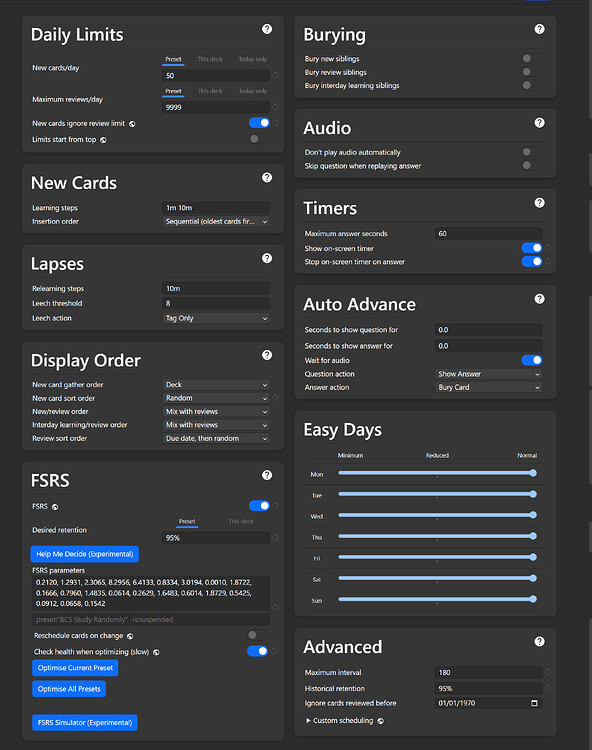
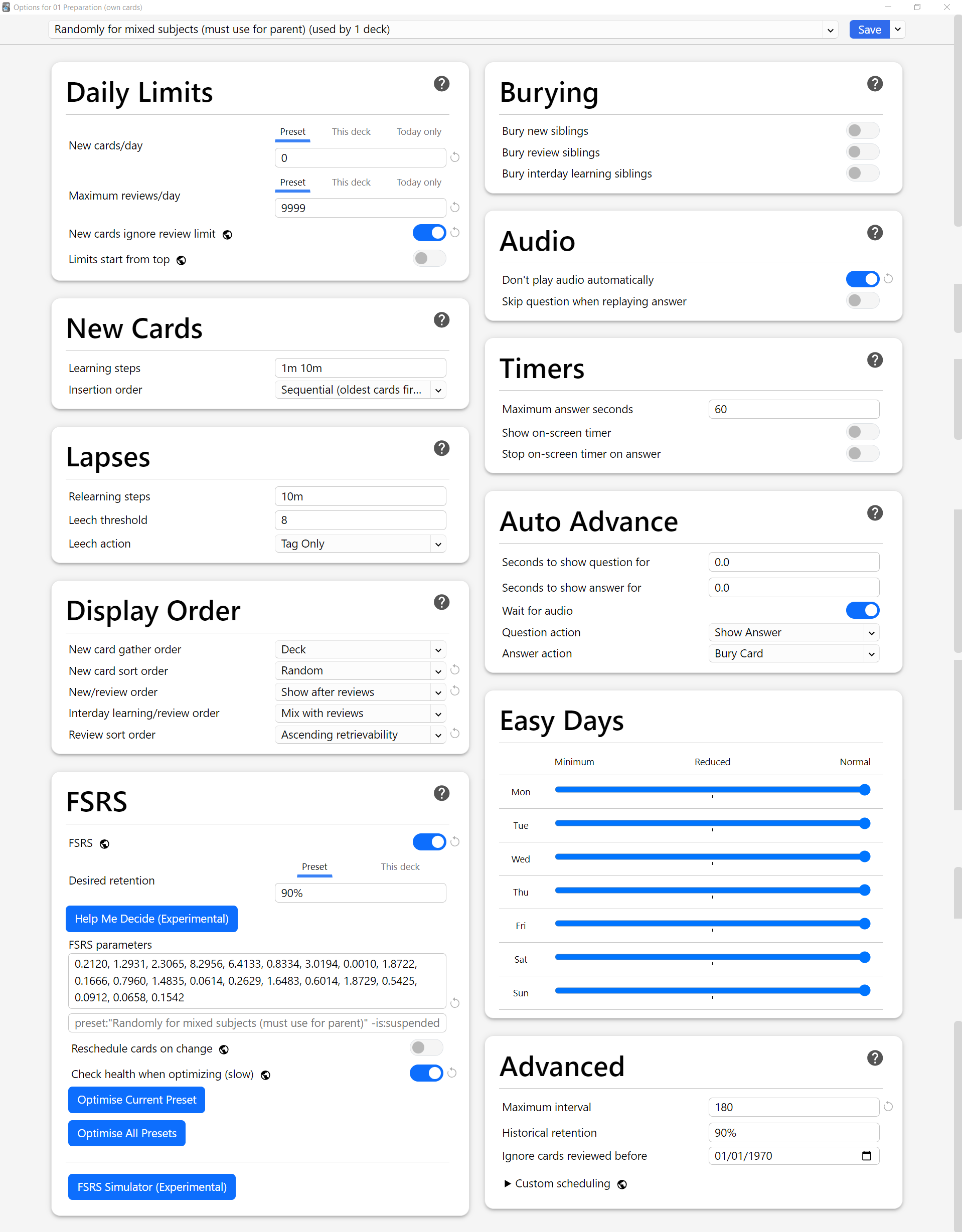
I’m fairly new to Anki (using it for a few months now : using the latest updated version both on desktop and ankidroid), and I’m preparing for a very competitive exam where accuracy is the biggest factor because of high negative marking, that demands a huge amount of memorization. The exam covers a wide range of subjects. My decks are structured by subject, with two level of subdecks only (e.g., Parent > English > Literature — no deeper nesting). I have attached my Deck and current Preset screenshot at the end.
What I want to do is:
Sometimes study a single subdeck (e.g., just “Ethics”).
Other times review everything at once from the parent deck (mixed/random from all subdecks, like a mixed-discipline test).
However, I’ve noticed:
When I study the parent deck, the counts for “New Cards,” “Learn,” and “Due” don’t match the total of all subdecks.
When reviewing the parent deck, cards are currently being shown in an ascending order by subdeck, instead of being shuffled randomly across all subdecks (which is what I want).
My goals:
When reviewing the parent deck, have cards pulled randomly from any subdeck, rather than in subdeck order (to mimic mixed-discipline testing).
Keep everything working smoothly on both desktop Anki and AnkiDroid (I try to avoid add-ons for compatibility).
Questions:
Why do the “New,” “Learn,” and “Due” counts differ between the parent deck and the sum of subdecks?
Is there a built-in way (or a cross-platform add-on) to view/study the actual total from all subdecks?
How can I make the parent deck review truly random across all subdecks, not ordered by subdeck?
Any recommended settings to achieve this without breaking compatibility?
Mostly – because of your limits. You showed us one Options preset. If all of your decks and subdecks are using that preset, and use the preset’s daily New limit of 50, then those limits interact – The Anki v3 scheduler - Anki FAQs .
It also looks like your parent decks aren’t “empty” – they aren’t just folders that hold other decks, they (at least some of them) have cards of their own. And it looks like you have more subdecks than just 01-12 that we see in your screenshot – which is why the the top-level totals for Due and Learn (which are unlimited) are so far off.
If you want to know how many cards actually exist – not subject to the daily study limits of any particular deck – that’s what the Browse window is for. You can click specific sets of cards in the sidebar, or search up any category of cards – decks, subdecks, tags, card state, etc. – to see how many are in it.
All the things you’re asking about are standard in all of the apps, so there’s no concerns there. Update your preset(s) in one place, and everything will sync with the rest of your collection.
Hi there, thank for the very clear reply.
When I want to study new cards, I’ll do that by subdecks one by one. But when I want to do reviews/relearning, I’ll do that from the parent deck, so it feels like a mixed test. For that I decided to use two preset, one for the parent deck, the other for the subdecks. I’m adding the preset settings screenshot. will this setting serve my purpose? I would appreciate your thoughts regarding the preset settings. you can suggest settings that may serve my purpose.
When you click the parent deck, the only things that come from the parent-deck Options are the “Display Order” settings and the impact of the parent deck limits. Everything else comes from the other preset – for the subdeck the cards are actually in.
Other things I noticed on closer examination, which you might want to reconsider –
Desired Retention – 95% is extremely high. Are you sure that’s a good decision?
Parameters – You should optimize your FSRS parameters, and come back monthly to re-optimize. If there are any cards that are directly held in the top-level parent deck (are there?), they will not be included in the optimization of the other preset.
Max interval – 180d is too short. The purpose of spaced repetition is that your easier cards get longer and longer intervals and get out of your way, so you can focus on your more challenging cards. This interferes with that. If you can’t handle the default of 100y (36500d), most folks are happy with something in the 3-5y range (1000-2000d), but you should at least make it 1y.
Historical retention – You don’t need to touch this setting unless it’s to deal with certain very specific problems in your review history. Click the circle-arrow next to the field (and then confirm) to reset that to default.