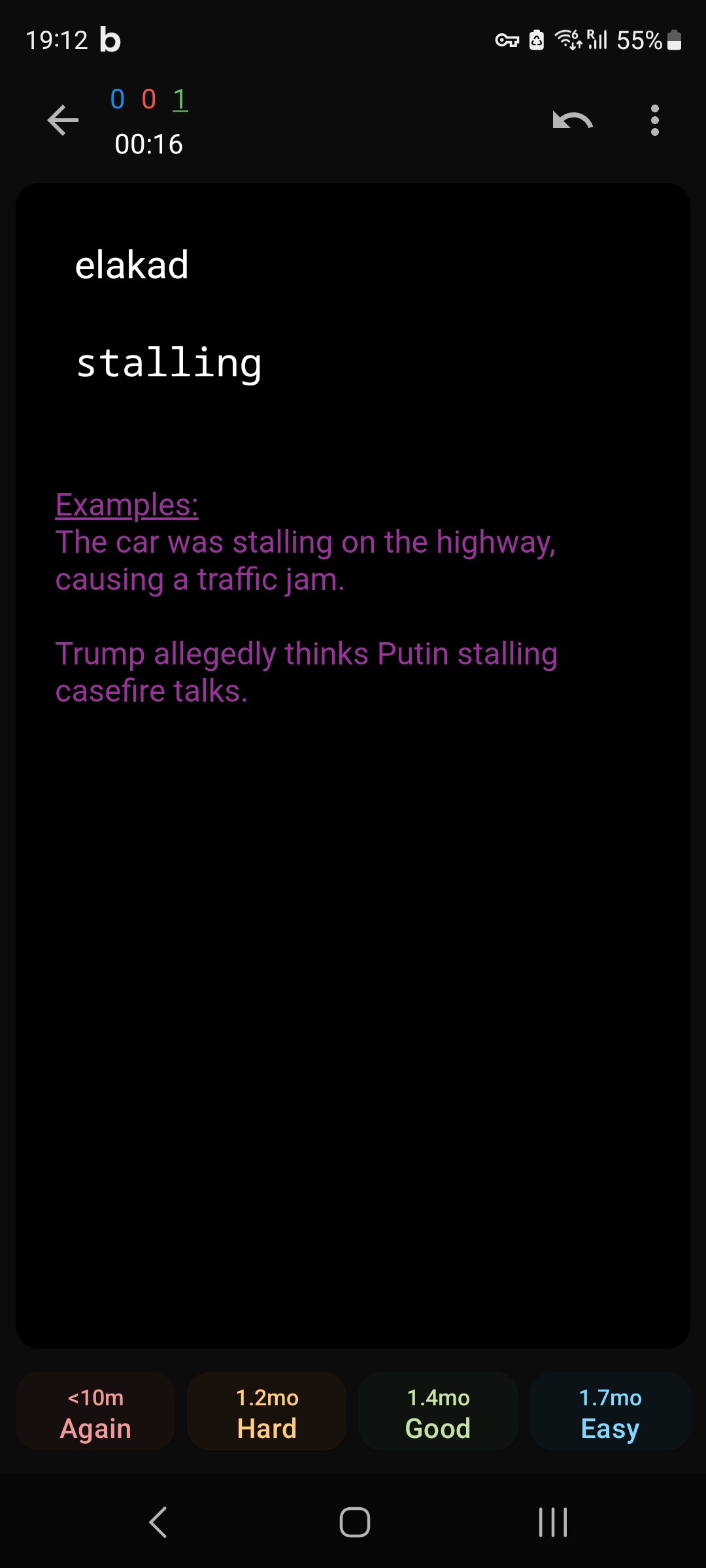
Thanks for this beautiful Anki software. I use it for more than 10 years. This is a really great product.
I am writing you regarding to the ‘example’ section of a deck, Android app
If I use dark mode on my phone then a bit hard to read the example text on the phone because the used color is not really good. Is it possible to change the purple color to for example yellow, that more brighter then the current one?
You control that yourself within your note and note type. There are 3 Styling and formatting places that could be coming from.
The styling for your note type, where classes of formatting can be defined overall for all of the cards, or for specific cards, or specific parts of cards.
The card templates themselves call those classes defined in styling, but they can also contain formatting for specific field replacements.
Formatting in the text of a specific note is controlled in the note editor by the editing toolbar. If there’s a lot of that to remove, Find and Replace might be useful. You might need to open the HTML view (click < > above the field) to see it in the field.
The usual and most efficient places to have that formatting are #1 and #2 – but it won’t matter what you change there if there’s something interfering at #3, which is closest to the text, so it will take precedence over formatting applied at a more distant level. So start down at #3 and work your way up.
Once you figure out what needs to change, if you need more specific help with the HTML or CSS in your templates/Styling, you can post it here – as text (not a screenshot), and in a
```