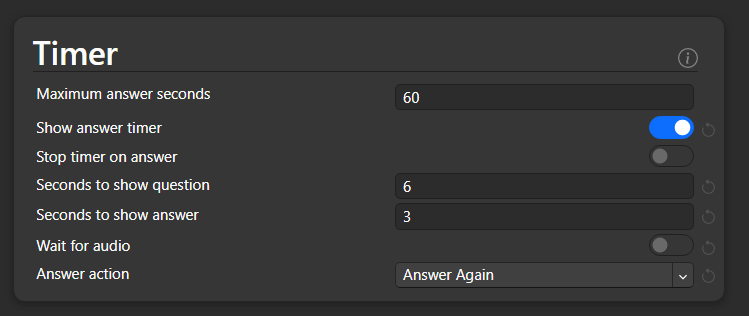
Windows10, no add-ons, qt6. I was also able to reproduce it using 23.10.1, but not on 2.1.66. Did not test on 23.10.
Choose a note type that has at least one card type entirely wrappen in a conditional replacement. For example, use the stock note type Basic (optional reversed card)
→ Anki will automatically edit the template adding the first field of the note type right after the closure of the conditional replacement. If the note type has multiple card types entirely wrapped in a conditional replacement, Anki will append the first field to all of them.
I’d expect Anki:
A) to automatically show the answer after 6 seconds, then,
B) to show answer during 3 seconds, then,
C) to automatically press “Again” for me, then.,
D) to show the next question and automatically show the answer after 6 seconds.
A works as expected, B and C do not, the answer remains on the screen until one of the answer buttons is clicked. D does not work either, after manually clicking on any answer button, the More > Autoadvance option gets deactivated and no answer is automatically shown.
On the other hand, I think the autoadvance option would make more sense as a general option under Preferences > Review. Personally I find having to configure that option in the deck options, and activating it in the “More” menu a bit confusing and counterintuitive.
I don’t know what sample size you are talking about, so I only tested the settings here.
Output does not seem to vary with the same input, but some points do change if I multiply the time and deck size:
Please correct me if I am wrong. I guess that your expectations, A and B, are mistaken.
From these settings above, the followings behaviors are expected based on the explanations below, I think.
A’) to automatically show the answer after 3 seconds, then,
B’) to show answer during 6 seconds
That said, I also feel those two items are misleading. I think it would be more intuitive and easier to understand for users if the order of them were switched and the “question” were replaced with “next question”, as in the settings of AnkiDroid.
(Current order and wording) Seconds to show question Seconds to show answer
↓
(Suggestion) Seconds to show answer Seconds to show next question
To further reduce chance of confusion I would suggest: Seconds until reveal answer Seconds until show next question
since ‘to’ is a bit ambiguous and could mean either “Seconds to show answer [for]” or “Seconds to
[wait before] show answer”.
Thank you for the feedback.
Though I’m not familiar with whether the succinct wordings (until + base-form-verb) are natural for items of settings, I agree that the ‘to’ is a bit ambiguous. I wish the order switching above would lead user’s intuition properly and complement the ambiguity…
Windows 10, qt 6, no add-ons. Also reproduced this on 23.10.1, but not on 2.1.66. Did not test on 23.10.
If you click on an image so that the float + toggle actual size options appear, if you click elsewhere in the field, the image keeps its focus
(actually, as far as I remember, this occurred since the introduction of the feature, but IMHO it is a bit counterintuitive and unwieldy).
In 23.10.1 and 23.12 beta1, if you unfocus the image by clicking elsewhere in the editor (e.g., by focusing another field), the double-click to expand and float + toggle actual size options continue being displayed, even though they do not work.
Typing anything/using any keyboard shortcut seems to be the only way to undo this.
There’s some funny business going on with {{type: }} fields. This was also happening in 23.10.1
Edit: the <hr id=answer> tag turns out to be the culprit. You have to put “answer” in quotation marks: <hr id="answer">, and then it works fine.
In the first case, there’s a {{type: }} field in the front template but not in the back. Everything looks good in preview, but when reviewing the card, the back gets mixed up. An <hr> tag goes missing, and the two fields appear side by side on the same line.
Now we try adding the {{type: }} field to the back as well. Now it’s messed up in both the preview and while reviewing the card, but in different ways.
<hr id=answer> behaves kind of like a special syntax, as far as I understand it it is mainly meant to be used in combination with the {{FrontSide}} field and/or if you want to use template editor’s Flip button.
Well, <hr> is just a standard HTML tag, and id= is one of the global attributes that can be used with it, or with any other HTML tag. But standard HTML syntax does require the quotation marks.
I guess some HTML parsing engines are forgiving and still work even if no quotation marks are used. But maybe the toolkit uses a stricter HTML parser now?
The behavior is not new, I remember Anki worked like this at least since about version 2.1.50.
An example of what I mean when I say that <hr id=answer> is treated kind of like a special syntax by Anki and is mainly meant to be used together with the {{FrontSide}} field: